KarelHusaFrequent ContributorJoined 10 years ago401 Posts229 LikesLikes received75 SolutionsView All Badges
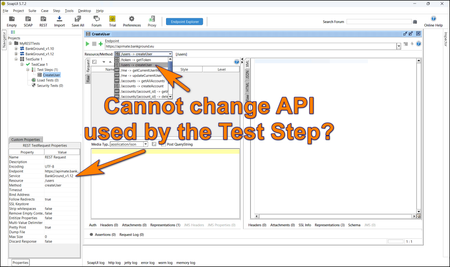
ContributionsMost RecentMost LikesSolutionsRe: 20 years of SoapUI - Share your story SoapUI was a precious tool when I started working with APIs. SoapUI provided visualization, making APIs much easier to understand. I used SoapUI in various API training sessions and saw its impact. We have used SoapUI on large projects involving hundreds of APIs and successfully automated tests using Groovy scripting. Working with SoapUI was a joy. Its simplicity and versatility made SoapUI the best choice for both beginners and experts. Many other API testing tools currently available stand on the shoulders of SoapUI. SoapUI has its place in a gallery of good software design. SoapUI 5.9.0 released Did you know SoapUI 5.9.0 has been released? See https://github.com/SmartBear/soapui/releases/tag/v5.9.0 The ugly bug that required you to switch between the Raw and XML tabs all the time has been resolved. Congratulations to the Polish SmartBear team for taking over SoapUI releases! Re: OpenAPI/Swagger 3.0 Support Importing OpenAPI definitions with refs works fine, at least for many API definitions I have imported. You must ensure all the referenced objects are in your file. I have prepared a brief article on how to import the OpenAPI definitions: https://www.linkedin.com/pulse/soapui-hack-openapi-3-karel-husa-9dsxf/ Re: Is SoapUI still supported? Two last versions of SoapUI were released to update vulnerable components for security reasons. New functions haven't been introduced in SoapUI for many years already. How to change the API of a REST test step Hi guys, If you test REST APIs in SoapUI, you may encounter an issue where you cannot change the API attached to the REST test step. I am not aware of any standard way to do it, so I prepared a simple Groovy script to change the test step's API programmatically: testRunner.testCase.getTestStepList().each(){ step = it service = step.getService() log.info("TestStep: ${step.getName()}") config = step.getRequestStepConfig() log.info "Before: ${step.getService()}" config.setService("BankGround_v1.12") log.info "After: ${step.getService()}" } I thought this may help those of you who work with REST APIs, which get changed over time (new versions). For a longer story, you can visit the following article: https://www.linkedin.com/pulse/soapui-what-rest-api-changes-karel-husa-7vb2e Re: Import from SoapUI (Open Source) to ReadyAPI ColinM, it's probably a ReadyAPI bug. ReadyAPI should import a SoapUI project seamlessly unless you have a specific plugin installed which would introduce a new Test Step, unknown to ReadyAPI. If you haven't used specific tests steps from 3rd party plugins for your SoapUI project, you need to raise a support ticket for ReadyAPI. Re: How do you reuse your ReadyAPI Groovy scripts if you want to run tests in a pipeline? Cleo-Juniper, if your external Groovy/Java code needs to be shared amongst all tests, you can place it in a separate Git repo. At your local computer, checkout the repo and configure your ReadyAPI to point into that directory. In the pipeline, you need to setup ReadyAPI. Checkout of the shared code repo would be part of this ReadyAPI setup (probably as a ready-made container). So in each test pipeline you won't need to do extra work. Re: creating variables in ReadyAPI. JAfolabi, OK, converting Postman Collections into ReadyAPI project is a completely different topic so you should close this question and open another one. Re: creating variables in ReadyAPI. JAfolabi, ReadyAPI has a rich documentation -- to learn about properties (variables), you can start here: https://support.smartbear.com/readyapi/docs/testing/properties/index.html Re: Xpath Assertion with only Child gives 'null' instead of the value from the Child". jlewi1, your XPath expression: //collection[1] should really select the collection XML node.