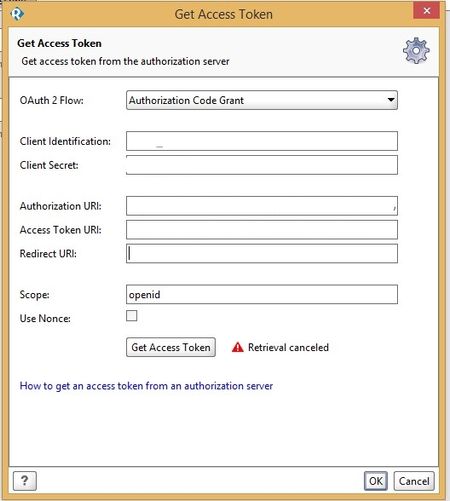
ContributionsMost RecentMost LikesSolutions[JDBC] -Some connection settings are not specified. Hi For some reason, my jdbc request is not working via maven plugin - running step [Get companies from db with one IT package] - An error occurred [Some connection settings are not specified.], see error log for details - com.eviware.soapui.support.SoapUIException: Some connection settings are not specified. com.eviware.soapui.support.SoapUIException: Some connection settings are not specified. at com.eviware.soapui.support.jdbc.JdbcUtils.initConnection(JdbcUtils.java:40) at com.eviware.soapui.impl.wsdl.panels.teststeps.JdbcSubmit.getDatabaseConnection(JdbcSubmit.java:188) at com.eviware.soapui.impl.wsdl.panels.teststeps.JdbcSubmit.prepare(JdbcSubmit.java:214) at com.eviware.soapui.impl.wsdl.panels.teststeps.JdbcSubmit.runQuery(JdbcSubmit.java:171) at com.eviware.soapui.impl.wsdl.panels.teststeps.JdbcSubmit.run(JdbcSubmit.java:145) at com.eviware.soapui.impl.wsdl.panels.teststeps.JdbcSubmit.<init>(JdbcSubmit.java:77) at com.eviware.soapui.impl.wsdl.panels.teststeps.JdbcRequest.submit(JdbcRequest.java:133) at com.eviware.soapui.impl.wsdl.teststeps.JdbcRequestTestStep.run(JdbcRequestTestStep.java:203) at com.eviware.soapui.impl.wsdl.support.AbstractTestCaseRunner.runTestStep(AbstractTestCaseRunner.java:251) at com.eviware.soapui.impl.wsdl.testcase.WsdlTestCaseRunner.runCurrentTestStep(WsdlTestCaseRunner.java:50) at com.eviware.soapui.impl.wsdl.support.AbstractTestCaseRunner.internalRun(AbstractTestCaseRunner.java:161) at com.eviware.soapui.impl.wsdl.support.AbstractTestCaseRunner.internalRun(AbstractTestCaseRunner.java:1) at com.eviware.soapui.impl.wsdl.support.AbstractTestRunner.run(AbstractTestRunner.java:127) at java.util.concurrent.Executors$RunnableAdapter.call(Executors.java:511) at java.util.concurrent.FutureTask.run(FutureTask.java:266) at java.util.concurrent.ThreadPoolExecutor.runWorker(ThreadPoolExecutor.java:1142) at java.util.concurrent.ThreadPoolExecutor$Worker.run(ThreadPoolExecutor.java:617) at java.lang.Thread.run(Thread.java:745) com.eviware.soapui.support.SoapUIException: Some connection settings are not specified. at com.eviware.soapui.support.jdbc.JdbcUtils.initConnection(JdbcUtils.java:40) at com.eviware.soapui.impl.wsdl.panels.teststeps.JdbcSubmit.getDatabaseConnection(JdbcSubmit.java:188) at com.eviware.soapui.impl.wsdl.panels.teststeps.JdbcSubmit.prepare(JdbcSubmit.java:214) at com.eviware.soapui.impl.wsdl.panels.teststeps.JdbcSubmit.runQuery(JdbcSubmit.java:171) at com.eviware.soapui.impl.wsdl.panels.teststeps.JdbcSubmit.run(JdbcSubmit.java:145) at com.eviware.soapui.impl.wsdl.panels.teststeps.JdbcSubmit.<init>(JdbcSubmit.java:77) at com.eviware.soapui.impl.wsdl.panels.teststeps.JdbcRequest.submit(JdbcRequest.java:133) at com.eviware.soapui.impl.wsdl.teststeps.JdbcRequestTestStep.run(JdbcRequestTestStep.java:203) at com.eviware.soapui.impl.wsdl.support.AbstractTestCaseRunner.runTestStep(AbstractTestCaseRunner.java:251) at com.eviware.soapui.impl.wsdl.testcase.WsdlTestCaseRunner.runCurrentTestStep(WsdlTestCaseRunner.java:50) at com.eviware.soapui.impl.wsdl.support.AbstractTestCaseRunner.internalRun(AbstractTestCaseRunner.java:161) at com.eviware.soapui.impl.wsdl.support.AbstractTestCaseRunner.internalRun(AbstractTestCaseRunner.java:1) at com.eviware.soapui.impl.wsdl.support.AbstractTestRunner.run(AbstractTestRunner.java:127) at java.util.concurrent.Executors$RunnableAdapter.call(Executors.java:511) at java.util.concurrent.FutureTask.run(FutureTask.java:266) at java.util.concurrent.ThreadPoolExecutor.runWorker(ThreadPoolExecutor.java:1142) at java.util.concurrent.ThreadPoolExecutor$Worker.run(ThreadPoolExecutor.java:617) at java.lang.Thread.run(Thread.java:745) - Assertion [JDBC Status] has status UNKNOWN My POM is: Re: Authorization automation script for consent screen i'm asking about this functionality https://www.soapui.org/oauth2/automating-access-token-retrieval.html and in my case "Page 2" is not working Authorization automation script for consent screen Hello How scripts for "consent page" and other pages are working? My script is working for the first page, but it doesn't work for "consent page". Should it be in the same section? Script: page 1 (login page) [this script is ok] function login() { if (document.getElementById('Email')) { document.getElementById('Email').value = 'emailAccount'; document.getElementById('next').click(); setTimeout(providePassword, 3000); } } function providePassword() { document.getElementById('Passwd').value = 'emailLogin'; document.getElementById('PersistentCookie').checked = false; document.getElementById('signIn').click(); } login(); page 2 (consent screen) [not working]: function consent() { document.getElementById('submit_approve_access').click(); } setTimeout(consent, 5000); Auth profile parameter for maven plugin Hello. I'm working with different environments and for this reason, i'm using <environment> parameter in pom.xml. But for different envs we have different auth profiles but i can't specify profile outside the project. Is there any parameter for this purpose? PS: i'm using auth manager in R!API 1.8.5 and maven plugin 1.8.0. Thanks in advance. How to configure Redirect_URI for OpenID Connect Hi. I'm trying to configure OIDC profile for my test. What is Redirect URI and how R!API handle this Thanks in advance 3d party reporting tool for maven build Hi. I'm trying to add 3dparty reporting tool (Allure) instead of the default (JUnit style HTML report) and after configuration build was passed without report due to lack of test results. Where can i found junit test results? (xml) Driver exception while running Selenium and SoapUI Ng tests Hi. I'm faced with a problem while running SoapUI tests with selenium using maven plugin. In case when i'm using Ready!API selenium tests work fine and in case when i'm using maven plugin i'm getting an error: 17:05:51,649 ERROR [SoapUI] An error occurred [Could not start a new session. Possible causes are invalid address of the remote server or browser start-up failure. Build info: version: '2.53.0', revision: '35ae25b', time: '2016-03-15 17:00:58' System info: host: 'xxxxx', ip: '192.168.152.141', os.name: 'Windows 8.1', os.arch: 'amd64', os.version: '6.3', java.version: '1.8.0_77' Driver info: driver.version: FirefoxDriver], see error log for details org.openqa.selenium.remote.UnreachableBrowserException: Could not start a new session. Possible causes are invalid address of the remote server or browser start-up failure. Build info: version: '2.53.0', revision: '35ae25b', time: '2016-03-15 17:00:58' System info: host: 'xxxxxxxxxx', ip: '192.168.152.141', os.name: 'Windows 8.1', os.arch: 'amd64', os.version: '6.3', java.version: '1.8.0_77' Driver info: driver.version: FirefoxDriver at org.openqa.selenium.remote.RemoteWebDriver.execute(RemoteWebDriver.java:665) at org.openqa.selenium.remote.RemoteWebDriver.startSession(RemoteWebDriver.java:249) at org.openqa.selenium.remote.RemoteWebDriver.<init>(RemoteWebDriver.java:131) at org.openqa.selenium.firefox.FirefoxDriver.<init>(FirefoxDriver.java:218) at org.openqa.selenium.firefox.FirefoxDriver.<init>(FirefoxDriver.java:211) at org.openqa.selenium.firefox.FirefoxDriver.<init>(FirefoxDriver.java:207) at org.openqa.selenium.firefox.FirefoxDriver.<init>(FirefoxDriver.java:120) at sun.reflect.NativeConstructorAccessorImpl.newInstance0(Native Method) at sun.reflect.NativeConstructorAccessorImpl.newInstance(NativeConstructorAccessorImpl.java:62) at sun.reflect.DelegatingConstructorAccessorImpl.newInstance(DelegatingConstructorAccessorImpl.java:45) at java.lang.reflect.Constructor.newInstance(Constructor.java:423) at org.codehaus.groovy.reflection.CachedConstructor.invoke(CachedConstructor.java:77) at org.codehaus.groovy.runtime.callsite.ConstructorSite$ConstructorSiteNoUnwrapNoCoerce.callConstructor(ConstructorSite.java:102) at org.codehaus.groovy.runtime.callsite.CallSiteArray.defaultCallConstructor(CallSiteArray.java:57) at org.codehaus.groovy.runtime.callsite.AbstractCallSite.callConstructor(AbstractCallSite.java:182) at org.codehaus.groovy.runtime.callsite.AbstractCallSite.callConstructor(AbstractCallSite.java:186) at Script1.run(Script1.groovy:4) at com.eviware.soapui.support.scripting.groovy.SoapUIGroovyScriptEngine.run(SoapUIGroovyScriptEngine.java:92) at com.eviware.soapui.support.scripting.groovy.SoapUIProGroovyScriptEngineFactory$SoapUIProGroovyScriptEngine.run(SourceFile:79) at com.eviware.soapui.impl.wsdl.teststeps.WsdlGroovyScriptTestStep.run(WsdlGroovyScriptTestStep.java:138) at com.eviware.soapui.impl.wsdl.support.AbstractTestCaseRunner.runTestStep(AbstractTestCaseRunner.java:213) at com.eviware.soapui.impl.wsdl.testcase.WsdlTestCaseRunner.runCurrentTestStep(WsdlTestCaseRunner.java:47) at com.eviware.soapui.impl.wsdl.support.AbstractTestCaseRunner.internalRun(AbstractTestCaseRunner.java:139) at com.eviware.soapui.impl.wsdl.support.AbstractTestCaseRunner.internalRun(AbstractTestCaseRunner.java:47) at com.eviware.soapui.impl.wsdl.support.AbstractTestRunner.run(AbstractTestRunner.java:129) at java.util.concurrent.Executors$RunnableAdapter.call(Executors.java:511) at java.util.concurrent.FutureTask.run(FutureTask.java:266) at java.util.concurrent.ThreadPoolExecutor.runWorker(ThreadPoolExecutor.java:1142) at java.util.concurrent.ThreadPoolExecutor$Worker.run(ThreadPoolExecutor.java:617) at java.lang.Thread.run(Thread.java:745) Caused by: java.lang.NullPointerException at org.apache.http.impl.conn.SystemDefaultRoutePlanner.determineProxy(SystemDefaultRoutePlanner.java:79) at org.apache.http.impl.conn.DefaultRoutePlanner.determineRoute(DefaultRoutePlanner.java:77) at org.apache.http.impl.client.InternalHttpClient.determineRoute(InternalHttpClient.java:124) at org.apache.http.impl.client.InternalHttpClient.doExecute(InternalHttpClient.java:183) at org.apache.http.impl.client.CloseableHttpClient.execute(CloseableHttpClient.java:71) at org.apache.http.impl.client.CloseableHttpClient.execute(CloseableHttpClient.java:55) at org.openqa.selenium.remote.internal.ApacheHttpClient.fallBackExecute(ApacheHttpClient.java:144) at org.openqa.selenium.remote.internal.ApacheHttpClient.execute(ApacheHttpClient.java:90) at org.openqa.selenium.remote.HttpCommandExecutor.execute(HttpCommandExecutor.java:142) at org.openqa.selenium.firefox.internal.NewProfileExtensionConnection.execute(NewProfileExtensionConnection.java:160) at org.openqa.selenium.firefox.FirefoxDriver$LazyCommandExecutor.execute(FirefoxDriver.java:380) at org.openqa.selenium.remote.RemoteWebDriver.execute(RemoteWebDriver.java:644) ... 29 more 17:05:51,659 ERROR [SoapUIProTestCaseRunner] run selenium failed, exporting to [C:\Work\xxx-core-api\target\soapui-results\R318-Selenium-run_selenium-0-FAILED.txt] 17:05:51,664 INFO [SoapUIProTestCaseRunner] Finished running SoapUI testcase [Selenium], time taken: 3805ms, status: FAILED 17:05:51,669 INFO [SoapUIProTestCaseRunner] Project [xxxxCore APIs] finished with status [FAILED] in 3839ms Also, i found some related issue: webdriver-exception-after-soapui-project-execution https://github.com/Ardesco/selenium-standalone-server-plugin/issues/23 is there any workaround to run the tests? It's very urgent for me. Thanks Re: SoapUI NG license for Ready!API tests That's the reason why i'm asking for workaround, i can't contact because licenses were bought long time ago (not by me), and i can't get any information. All i know that there are two licenses on remote build agents. For now i can only edit settings of teamcity job. And the question was, WHY with soapui-pro-maven plugin tests were executed and with ready-api-maven-plugin not? Re: SoapUI NG license for Ready!API tests It will not help me as it's not possible to find name and password of the activated user. All i know is that license is somewhere on build agent and it's working with SoapUI Pro 5.1.2 maven plugin, and not working with ReadyAPI 1.8.0. Maybe you can suggest how to find license file on build agent or how to configure TeamCity job properly? SoapUI NG license for Ready!API tests Hello. I'm using Ready!API 1.8 on my desktop and i have installed SoapUI PRO on TeamCity build agents. When I'm running my maven build with soapui-pro-maven-plugin 5.1.2 it goes well but when I'm trying to run tests with ready-API-plugin 1.8.0 it fails with no license error: [19:06:06][-api] No valid SoapUI NG license exists. [19:06:06][-api] Please enter absolute path of the license file (.zip or .key): how can i run my tests with ready API plugin? as i found in another topic it can be executed Smartbear.com | Maven-Soapui-Plugin-with-json-assertions-does-not-work-well-in