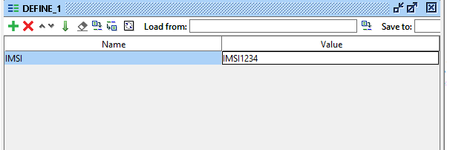
ContributionsMost RecentMost LikesSolutionsUnable to launch the SoapUI Open Source in MAC book pro Hii, After i installed the SoapUI5.6.0, and made the below updated as per installation instructions. Still i am unable to launch the SoapUI GUI in mac book. it just stuck at the starting image. Updates after installation: you can navigate to SoapUI*.app and do "Show Package Info" ( from popup menu ). Then you should see Contents directory. Open Info.plist file for editing where you can add: <key>soapui.jxbrowser.disable</key> <string>true</string> Re: SoapUI Freeze in mac HimanshuTayal : No I haven't modified/changed/removed any jar file. just two files are updated as mentioned above (.sh and .txt). Re: SoapUI Freeze in mac HimanshuTayal : i haven't removed anything from the jar file. SoapUI Freeze in mac I have recently installed SOAPUI5.5.0 on my MAC book pro And applied below Workaround, but still, i am unable to launch the soapui it is freezing. Image is attached. In Finder, /Applications/SmartBear/soapUI-5.5.0.app > Show Package Contents. Edit /Applications/SmartBear/soapUI-5.5.0.app/Contents/java/app/bin/soapui.sh. Uncomment this line# JAVA_OPTS="$JAVA_OPTS -Dsoapui.browser.disabled=true". [In other words, remove the "#" to stop it being a comment.] Edit /Applications/SmartBear/soapUI-5.5.0.app/Contents/vmoptions.txt. Add -Dsoapui.browser.disabled=true. Any other WA or solution to make it work??? Thanks in advance. Re: Groovy Script for stopping the testSteps after User selection Thanks for the help :) Groovy Script for stopping the testSteps after User selection Hi All, I am looking for a Groovy script to ask the user to Conti next steps or stop it? if the user selected yes (Conti) then next steps need to be executed, if no (stop) then it should cancel the execution of testSteps. Re: how to define variables in SOAPUI request It worked Rao. Many Thanks for the help Re: how to define variables in SOAPUI request Hi Rao, Can you pls help me define the custom properties. (Right-click on TestSteps --> Add Step --> Properties) After Defining the cust properties like this, i used the string mentioned below, but it didnt work <alias name="imsi" value="${#DEFINE_1#IMSI}"/> how to define variables in SOAPUI request I have a requirement for adding a variable to the SOAP request. Below is the sample request. IMSI123445 is the variable in the below request. how can i add the variable to SOAPUI? <?xml version="1.0" encoding="UTF-8"?> <soapenv:Envelope xmlns:soapenv="http://schemas.xmlsoap.org/soap/envelope/" xmlns:urn="urn:siemens:names:prov:gw:SPML:2:0"> <soapenv:Body> <spml:deleteRequest xsi:schemaLocation="urn:siemens:names:prov:gw:SPML:2:0 prov-gw-spml-2.0.xsd" xmlns:spml="urn:siemens:names:prov:gw:SPML:2:0" xmlns:xsi="http://www.w3.org/2001/XMLSchema-instance"> <version>SUBSCRIBER_v51</version> <objectclass>Subscriber</objectclass> <identifier alias="imsi">IMSI123445</identifier> </spml:deleteRequest> </soapenv:Body> </soapenv:Envelope> SolvedRe: how can I give a variable in my load test, Hi Rupert Many thanks for the quick reply I am okay to have a random number for each run. I am a new to SoapUI, can you please help me in getting the exact syntax pls for the line below: <userEquipmentInfoData>11122233344455</userEquipmentInfoData> the 111222333344455, I want to have this value generated randomly Or pls help in writing the code to take the numbers from the text file on my computer.