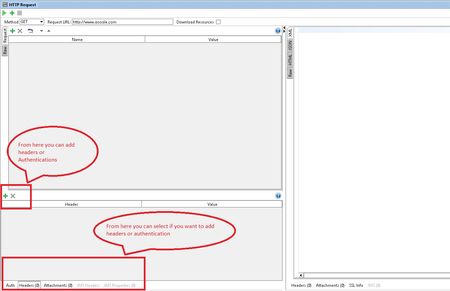
ContributionsMost RecentMost LikesSolutionsSOAPUI + Selenium WD integration can someone provide any information regarding how to integrate selenium WD in SOAPUI. step by step information will be highly appreciated. Re: occasional consulting hours anyone? send me your TDD and I will see what I can do for you. Re: Newly created Database connection which is associated to an environment is not getting changed. parametrize it to some parent properties (testcase or testsuite or may be project if required) and call it from there, whenever there is a change in DB connection setting you only have to update in that parent property file. Re: How I add HTTP headers to all HTTP requests in a project, there is an alternate way i.e. VIA groovy. ////////////////////////// import com.eviware.soapui.support.types.StringToStringMap def headers = new StringToStringMap() headers.put("Header1","value123") testRunner.testCase.getTestStepByName("HTTP Request").testRequest.setRequestHeaders(headers) /////////////////////////// in above script Header1 is the name of header value123 is the value of Header1 and HTTP Request is the name of test step if you have many test step you can do multiple iteration using this code. let me know if you need further help. Re: How I add HTTP headers to all HTTP requests in a project, you can add headers for HTTP REST or SOAP from the request. look at the bottom of your request screen there are options for it. see highlighted part of attached image & Auth Re: Get xls data in loop in groovy script try following: Download jxl jar from http://www.java2s.com/Code/Jar/j/Downloadjxljar.htm Place copy of this jar file in following folders of your soapui installation: SoapUI-5.2.1\lib SoapUI-5.2.1\Bin\ext Create a sample excel sheet at any location (in this case I am placing my excel sheet in C drive folder name Excel i.e C:\\Excel) with any name (in this case I am using Temp.xls) Let’s say your excel sheet has following values @ A1 value1 is “SOAPUI1” @B1 value2 is “Smartbear1” @C1 value3 is “20161” @ A2 value1 is “SOAPUI2” @B2 value2 is “Smartbear2” @C2 value3 is “20162” And you would like to load these values in your soapui testsuite properties. Create three properties in testsuite properties “RowSelector” “Start” //enter the start row value of your excel sheet in this case it will be 0 “End” //enter the end row value of your excel sheet in this case it will be 2 Create following groovy test step (test step name GroovySetup)at the beginning of all test steps import jxl.* import jxl.write.* def value1 def value2 def value3 //pull value from test suite properties def RowSelector = testRunner.testCase.testSuite.getPropertyValue( "RowSelector" ) //Read Excel Workbook workbook = Workbook.getWorkbook(new File("C:\\Excel\\Temp.xls")) //creating a copy to save results in WritableWorkbook copy = Workbook.createWorkbook(new File("C:\\Excel \\Results\\Output.xls"),workbook) File datasheet = new File("C:\\Program Files\\SmartBear\\SoapUI-5.2.1\\bin\\ext\\dataSheets\\ResultTemp.xls") if (datasheet.exists()){ log.info("Exist") } else { log.info("Blank") } // loading Values from Excel (A1) to TestSuite properties value1 = wb.getSheet(0).getCell(0, RowSelector).getContents() //cell A1 testRunner.testCase.testSuite.setPropertyValue( "TestSuitevalue1", value1 ) log.info("Value1 Is: " + value1) // loading Values from Excel (B1) to TestSuite properties Value2 = wb.getSheet(0).getCell(1, RowSelector).getContents() //Cell B1 testRunner.testCase.testSuite.setPropertyValue( "TestSuitevalue2", value2 ) log.info("Value2 Is: " + value2) // loading Values from Excel (C1) to TestSuite properties Value3 = wb.getSheet(0).getCell(2, RowSelector).getContents() //Cell C1 testRunner.testCase.testSuite.setPropertyValue( "TestSuitevalue3", value3 ) log.info("Value3 Is: " + value3) wb.close() //End Groovy step --------------------------------------------------------------------------------------------------------------------- This groovy will load value from excel to your testsuite property. Now you can use these values as they are now available in your testsuite properties. If you would like to apply loop then at the end of the testcase add another groove script apply a loop counter code It should be something like ----------------------------------------------------------------------------------------------------------------------- //Start Groovy step (say name GroovyLoop) def RowSelector = testRunner.testCase.testSuite.getPropertyValue( " RowSelector " ) def Start = testRunner.testCase.testSuite.getPropertyValue( " Start " ) def End = testRunner.testCase.testSuite.getPropertyValue( "End" ) def start = ‘0’ //Loop start value u can use it for defining row or coloumn def end = ‘0’ //Loop end value u can use it for defining row or coloumn //setting up loop For (RowSelector = Start; RowSelector<=End; RowSelector++){ testRunner.testCase.testSuite.setPropertyValue( " RowSelector ", RowSelector) //Reference https://www.soapui.org/Functional-Testing/controlling-flow.html testRunner.runTestStepByName( "GroovySetup") //calling first groovy step where we loaded excel and etc //if you have other test steps and you would like them to be part of this loop then place them too like sample below. //testRunner.runTestStepByName( "TestStepName") } Re: Get xls data in loop in groovy script you can use jxl jre for this, put it in your ext and lib folder and call excel sheet