zitryssOccasional ContributorJoined 10 years ago6 Posts5 LikesLikes received1 SolutionView All Badges
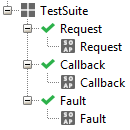
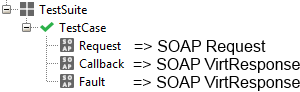
ContributionsMost RecentMost LikesSolutionsRe: Asynchronous Service Hi Rupert, thank you for a nice piece of advice! It helped me very much. I made it a little bit different, but the main approach is the same. Here is how I did it: 1. I created a TestSuite with 3 TestCases 2. TestSuite was set up to execute all TestCases in parallel 3. Then each of MockResponses contains a TearDown Script For Callback TC: testRunner.testCase.testSuite.getTestCaseByName("Fault").getTestStepByName("Fault").cancel() For Fault TC: testRunner.testCase.testSuite.getTestCaseByName("Callback").getTestStepByName("Callback").cancel() 4. And don't forget about timeouts for each. Here is final result: Kind Regards, Eugene Asynchronous Service Hello everyone, I am trying to create a test case for an asynchronous service, but the problem is that I have 2 different bindings where responses may come from. And more important: only one response comes each time. So, as you may guess, the main problem is how to start both listeners simultaneously and stop execution as soon as the first response comes. Confirmation response is received Fault response is received I've already tried to set up the "Start Step" in MockResponses, as it is described here, so 2 test steps could start at the same time, but it seems that this option is designed to help only when all the responses supposed to come. Do you have any ideas? Sincerely, Eugene SolvedDataSource Loop Hello everyone, I was wondering if anyone already tried to solve a case, where you need to check if a row in "DataSource" test step is the last one and if it is to make it all start all over again. I was hoping to solve it with some kind of Groovy script, something like that: def currentRow = testRunner.testCase.testSteps["DataSource"].currentRow def lastRow = testRunner.testCase.testSteps["DataSource"].lastRow if (currentRow == lastRow) { currentRow = 1 } Obviously it doesn't work... Do you have any ideas? Thank you in advance for any help you can provide! Kind regards, Eugene Change a request XML from Groovy Hello everyone, currently I am experimenting with Groovy and looking for the way to write the prettyfied XML back in the Request of Mock Response test step. Here is what I already have: def non_formatted_xml = context.expand('${Mock Response#Request}') def formatted_xml = groovy.xml.XmlUtil.serialize(non_formatted_xml) As you may see there is only one last operation missing. Does anyone know how to write XML back? P.S. Thank you in advance for any help you can provide! Sincerely, Eugene Re: Pretty print of response messages Hello Rao, thank you gratefully for the link! Now I am able to beautify an incoming XML and there is only one problem left for me. The question is how to write the prettyfied XML back in the Request of Mock Response test step. Here is what I already have written: def non_formatted_xml = context.expand('${Mock Response#Request}') def formatted_xml = groovy.xml.XmlUtil.serialize(non_formatted_xml) And again thank you in advance! Best wishes, Eugene Pretty print of response messages Hello everyone, recently I noticed, that when the asynchronous responses are received and then shown in the MockResponse step, they are not formatted by default. The funny thing is that the option "pretty print response messages" in on. Is there any another way of formatting a XML? Probably with the help of Groovy script? Thank you in advance for any help you can provide! Kind regards, Eugene Solved