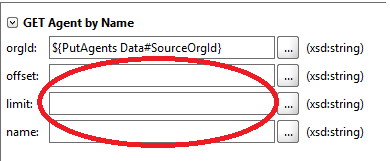
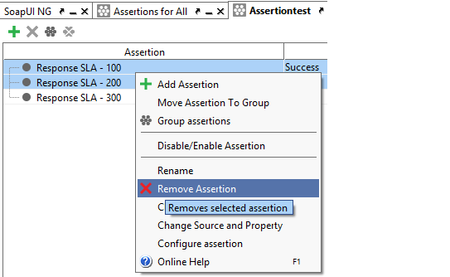
ContributionsMost RecentMost LikesSolutionsRe: not able to delete Test Suite I had same problem with a project I created in 1.3.1. Besides the deleted Test Suites coming back, I also ended up with multiple copies of some of them. I finally gave up and created a new project (in 1.3.1) and cloned just the items I wanted to it. Once I was satisifed that it was working correctly, I converted it to a composite project and then upgraded to 1.6. It was painful but seemed the best route. So far I haven't had to delete any test cases or test suites from this new project and honestly a little fearful about doing it. Greg Re: SQL Data mappings for REST parameters randomly getting wiped out I will definitely contact support with steps when I get them but so far no reproducible pattern. I just wasted an hour or 2 trying to figure out why a test case that worked a few days ago suddenly started failing. I thought it was a regression with our API but turns out the "Property" value for my Assertion teststep magically changed from "ResponseAsXml" to "Response". Once I set it back all is well again. Very frustrating, support has opened up 4 defects for me in just the past 2 weeks and I have at least 2 more to track down and report. SQL Data mappings for REST parameters randomly getting wiped out This is driving me crazy. I upgraded from 1.3 to 1.6 a few weeks ago. Last week I ran into a couple of previously working test cases that were failing. Discovered data mappings were missing, thought maybe it was me, fixed them and moved on. Today I've run into again and this time I know it wasn't me (and comparing the files from my last check-in I can see they were there a few days ago). I am using SQL db as my data source and using the "GetData" option to map REST parms like this: ${PutAgents Data#SourceOrgId} Unfortunately I haven't figured out how to reproduce and I've made too many changes to revert to the previous version. Anyone else seeing this? I recently reported a reproducible problem to Support where my Target/Source mappings in a DataSource Loop step were getting wiped out. Seems to be a theme with 1.6. I will reply to this and email support if I can find steps to reproduce. Regards, Greg Re: "Inherit from parent" authentication (REST) still not working for me in 1.5.0 I waved the white flag and went back to v 1.3.1. I had a few test cases that insisted on using an older set of creds that are no longer valid. At least now I can change creds for each REST test step. At times I love this product but also curse it quite frequently. Definitely leaves something to be desired when it comes to stability, I have programmed myself to exit/restart it every few hours. "Inherit from parent" authentication (REST) still not working for me in 1.5.0 I just upgraded Ready! API from 1.3.1 to 1.5.0 I read a recent post in the forum that 1.4 had fix for Inheriting Authorization but I am still not having any luck getting it to work with REST requests. Here is my setup: In my Environment Config settings I have "Auth Profile " set to "No Authorization". From a previous post on this forum, I was told that setting this to a profile would overirde all other Authorization settings (some of my test cases use groovy scripts to change user/pw). On the HTTP tab (in Preferences), I have the "Adds authentication information to outgoing request" option enabled. In the "Auth Manager" dialog I set the top level "Authorization Method" to "User1" profile. At the "Apply selected profile to all children items?" prompt, I select Yes. Expanding the tree on the Auth Manager dialog, I see that all TestSuites and Testcases are now set to "Inherit from Parent" (I assume this should mean "User1") and all the botton level REST requests are set to "No Authorization". If I edit my test cases and look at the "Authorization" tab for my REST requests, they are all set to "No Authorization". Problem 1: Before Upgrade to 1.5 I had individually set each request to use the "User1" profile on the Authorization tab. After upgrading to 1.5, the values were reverted to "No Authorization" for all of my REST requests. I don't think upgrading should change this setting. Problem 2: If I try to manually edit a request (at the test step level) and change the authorization from "No Authorization" to any User Profile, the change appears to be made but the options are disabled (greyed out) and when I close and re-open (even after a save), the authorization is changed back to "No Authorization". Problem 3: I have found that regardless of what I profile I switch to in "Auth Manager", the credentials that get used are always those from my "User1" profile (the user I had hardcoded my requests towith 1.3.1). Problem 4: It doesn't matter what I settings I use for authenticate pre-emptively (user preference or at the Profile level), all of my requests always make the first attempt without my creds. I think this is same behavior from 1.3.1. Note: If I could get the Inherit from parent option working as expected I wouldn't care about Problems 1 and 2 above. Also, after any change I always Save (Ctrl+Alt+S) as well as Reload the project (F5). Before I submit a bug report I am wondering if I am just doing something stupid. Any help/ideas appreciated. Regards, Greg Bug: Multi-selecting assertions does not disable Remove from right-click menu - potential data loss Using Ready! API 1.3.1. I have an Assertion Step that contains 3 assertions as shown in image. Multi-select the first 2 by pressing the Ctrl key and selecting with mouse (doesn't matter which on is selected first). The 'X' is disabled but if I right-click and select "Remove Assertion" the 1st and 3rd ones are deleted. Note: What actually gets deleted depends on how many you have total and how many are selected. Simple solution is too just disable the option from Right-click menu until multi-delete is supported. Luckily I was able to exit without saving to get my assert back :) Regards, Greg Re: Data connection not returning rows, but the log/UI says it does Found the problem. The property names that are automatically created when creating the DataSource ("Affect properties" checkbox is checked) are prefixed with database, schema and tablename. Renaming the properties to match my field names fixed my problem. The irony is that I has just completed the online training and specifically remembered the instruction to make sure "affect properties" is checked so you don't have to go through pain of creating fields. It is still painful to have to rename them all. Re: Data connection not returning rows, but the log/UI says it does Any update on this issue? I am running into the same problem. If I go into the Query Builder and run it, the 'Result Preview' window displays my data. But when I run it from the Data Source window, I see same behavior as noted in original post. This is not cosmetic issue. I cannot use this data in property expansions in a script assertion because all fields are evaluating to empty string (""). If I change my Data Source to a flat file, my script assertions work as expected. I am using Ready API! 1.3.1 My JDBC driver from my data source is: com.microsoft.sqlserver.jdbc.SQLServerDriver Any help/suggestions greatly appreciated as I really prefer to use SQL as my source over text file. Thanks, Greg Re: Need help with REST authentication - Unable to switch user authentication Jeshtha from support solved my problem in 2 minutes. I had my user creds stored in my Environment and those override everything. Once I removed them from the environment and reloaded the project everything worked as expected. Thanks to SmartBear support for a speedy and succesful outcome! Greg Error trying to create report (" Class not set for parameter : TestSuiteCoverage" ) Using Ready! API 1.3.1 (had same issue with 1.2.x). I often get the following error when I try to generate a report after running a TestSuite: ERROR:net.sf.jasperreports.engine.design.JRValidationException: Report design not valid : 1. Class not set for parameter : TestSuiteCoverage A temp workaround that I found is to run a TestCase, generate a report and then go back to the TestSuite (no need to re-run it) and generate the report. I would like to know if there is a more permanent workaround/fix. Doing this every session is tedious. I searched forum and see there are multiple reports of this including this one that has a link to a possible 'solution' but the link just takes me to the old forum homepage, not to the particular post: http://community.smartbear.com/t5/SoapUI-NG/JRValidationException-Report-design-not-valid/m-p/32657/highlight/true#M15937 Would be nice to have this fixed or at least investigated since it seems to effect quite a few users. Regards, Greg