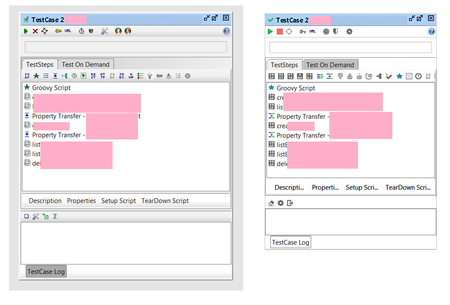
ContributionsMost RecentMost LikesSolutionsRe: wsdl refreshed Hello there! This sounds very similar to this issue: Project WSDL replaced from another project Re: Project WSDL replaced from another project My guess was right, after changing the URLs in the following places in the project file: <con:interface definition="https://localhost:8444/foo/bar?wsdl" ... > <con:definitionCache ... rootPart="https://localhost:8444/foo/bar?wsdl"> <con:part> <con:url>https://localhost:8444/foo/bar?wsdl</con:url> The tests work without an error. (I just changed the port number in the URL to something not used anywhere else) PS: The problem occurs also in SoapUI 5.6.0 GUI and in soapui-5.1.0.jar (used in a program to run the tests). Project WSDL replaced from another project I have SoapUI v5.8.0 and two projects loaded. I noticed that if I open the Interface Viewer for first project, then the WSDL for the second project gets overwritten by the WSDL of the first project. In steps: - close SoapUI - open SoapUI - in the project list on the left (the Navigator), expand the first project and double click the first (and only) interface (the icon with two green arrows, pointing left and right) - the Interface Viewer appears with correct data, including the third tab named "WSDL Content", which shows the correct WSDL - now expand the second project and double click the first (and only) interface there - the Interface Viewer appears with correct data in the first tab (named "Overview"), but the third tab named "WSDL Content", shows the WSDL from the first project! Most things work, but if a TestCase in second project has a "Schema Compliance" assertion, it will fail, as the schema in the wrong WSDL is used and it does not match the actual test case result for a web service response. It is similar, if I first open the Interface Viewer for the second project, ie: - close SoapUI - open SoapUI - expand the second project and double click the interface - the Interface Viewer appears with correct data, including the third tab named "WSDL Content", which shows the correct WSDL - now expand the first project and double click the interface there - the Interface Viewer appears with correct data in the first tab (named "Overview"), but the third tab named "WSDL Content", shows the WSDL from the second project! After exiting SoapUI, the wrong WSDL is not saved. Also, if I don't open the Interface Viewer after starting SoapUI but just run the test suites, a similar thing happens: if I first run the test suites from first project, and then the tests from second project, the second project tests will fail with "Schema Compliance" assertions, as again, the second WSDL is "overwritten" with the first. The problem appears also when running testcases from java (using class com.eviware.soapui.SoapUI from soapui.jar): if first project test suites are run and then second project test suites, the second project tests will have an assertion error as they will compare to the wrong WSDL schema (the one from the first project). Important detail: for both projects the WSDL URL (as shown in the first tab of Interface Viewer) is same. This is because both the projects (the servers, not the SoapUI projects) were developed, well on my PC and they were created at different times, when running in my IDE. So both URLs are like: https://localhost:8443/foo/bar?wsdl I guess this may be related to the problem and will try a workaround by editing the SoapUI project XML file to make the URLs different. Unless a better approach is suggested... Re: wsdl refreshed Another funny thing: I noticed in another project that its WSDL was also changed to a newer version, without me triggering that. Luckily I had backups of the soapUI project files and could easily revert. wsdl refreshed In soapUI 5.3.0 it happened that the WSDL was refreshed to some older version, and the tests failed in the "Schema Compliance" condition. I fixed it by using the "Update Definition F5" menu to reload the correct WSDL (from the same URL, which was correct all the time). Why did soapUI change the WSDL definition, without being asked to? Is it some bug? In the Interface dialog on the "WSDL Content" tab I can confirm, thet the wrong WSDL was shoen and after updating it was correct again. I restarted soapUI now and it happened again. A wrong version of the WSDL appeared again in this project. This worked fine for several days, until today 1 hour ago. I'm not sure, but it seems when I exit and start soapUI again, the bad WSDL appears. Any idea why this is happening? As said, it worked fine for days before that (with exiting and starting soapUI several times). Regards, David Look and feel issues, can it be changed? Hi! I upgraded from soapUI v4.5 to v5.3 and the new GUI feels strange, as if part of window edges are missing. See screenshot below (left is v4.5, right v5.3). If I select "Use native Look&Feel", only the window title bar changes. Is there a way to change the L&F? The Preferences dialog is even worse, it looks like a mix of the old and new style (the tabs titles on the left are grey/old, while the rest is new/all white, see second screenshot). I use Java8u131 64 bit on Windows 7. Regards, David Re: Default socket timeout On your link I don't see the default value mentioned. Ideally it would be printed in the popup that appears in the prefererences dialog when hovering over this setting. Regards, David Re: Getting JExplorer error opening projects The same thing started happening again (yesterday or so). After starting soapUI, it load the web page and then the dialog appears (see below). After clicking No, the entire process freezes and I have to kill it from Task Manager. Is there a way to simply disable the loading of the starter page? EDIT: It is in the Preferences, of course, under UI Settings. :) The content of the dialog: --------------------------- JExplorer --------------------------- An error has occured in the script on this page. Line: 0 Char 0 Error: Script error Code: 0 URL: http://smartbearsoftware.com/js/recent.js Do you want to continue running scripts on this page? --------------------------- Yes No --------------------------- Win standalone ZIP has JRE in itThe main page lists "Windows binary zip (no JRE)" , the link is http://sourceforge.net/projects/soapui/ ... p/download But the file does have JRE in it (and is quite big because of that). Regards, David