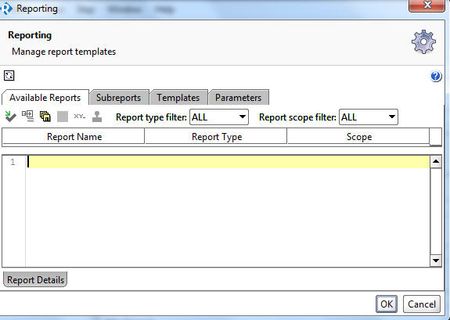
ContributionsMost RecentMost LikesSolutionsHow to use a variable within the context.expand string (groovy) I'd like to pass in a variable to the following command within a groovy script, in order to take advantage of the 1.7 functionality with respect to iterations on data sources: context.expand('${Roster#startDate::0}') where "0" would be replaced by an integer value (String or int, doesn't matter as long as it works). This is probably a basic groovy question but I can't seem the get the right combination. Thanks! How to use variable value for Rows Per Iteration? (1.7) I'd like to be able to use a variable value for the Rows Per Iteration field that was introduced in 1.7.0. I've been able to do this for other fields in the UI, but when I pass in a property to this field, it resolves to the actual value and leaves it that way. In other words, I've got a property ${DataSource#count} that I put in that field, but when I exit the dialog and return to it, it's been set to the actual value (e.g., "1"). Thanks! Re: Custom Logging of assert statements from Groovy script Thanks! I have a different hack, though. I changed the layout conversion pattern parameters in the log4j appender definition to include the date plus an extra line break (%n parameter), like this: <layout class="org.apache.log4j.PatternLayout"> <param name="ConversionPattern" value="%d{dd-MMM-yyyy HH:mm:ss} %n%m%n"/> </layout> With the results looking like this: 02-Dec-2015 09:26:17 assert expected == actual | | | Some Text| Some Unexpected Text false Re: Custom Logging of assert statements from Groovy script The reason I mention it is because if you include the date, and you elect to go with the groovy power assert formatting, it won't look right (those lines won't line up correctly). Instead of this: assert expected == actual | | | Some Text| Some Unexpected Text false You'll get this: 2015-12-01 23:05:26,655 INFO [LOGGER] assert expected == actual | | | Some Text| Some Unexpected Text false Re: Custom Logging of assert statements from Groovy script Hi -- Yes, I'd seen that post, and that's where I learned about setting up the custom logger. What I was missing was pretty simple -- how to get groovy assert results into that file. I needed to put the assert into a try/catch, like this: import org.apache.log4j.Logger def fileLogger = Logger.getLogger("ASSERTION.SCRIPT.LOGGER"); def String expected = "Some Text" def String actual = "Some Unexpected Text" assertVals(actual, expected, fileLogger) def assertVals(String actual, String expected, Logger logger) { if (expected != null) { try { assert expected == actual } catch(AssertionError e) { logger.info(e.getMessage()) } } } Two notes: If you want the "power assert" formatting in the file, leave it as above. If you want a more standard version on a single line, add the optional ": 'This is the result'" part after the assert statement. Not sure why that is, but it works. Because the "power assert formatting is sensitive, I turned off the formatting in the layout of the appender. <layout class="org.apache.log4j.PatternLayout"> <param name="ConversionPattern" value="%m%n"/> </layout> Of course, when you do that you don't get useful stuff like date/time. Thanks, Custom Logging of assert statements from Groovy script I'd like to use the "assert" statement in Groovy and would like to put that nice output into a separate file. Right now I see that it goes into the error file (ready-api-errors.log), but I'd like the assertions to go into their own file. I know I can set up a custom logger, and specify that in a script for other types of log statements that I write myself. However, I want the output of the groovy assert statement to go into that custom log file. I'm sure I'm missing something really simply here... Thanks! Environments Editor - can no longer "create empty" I just started playing with using Environments in 1.3.1. When I first started looking at this, if I created an environment with the "Empty" button, there was nothing in the various tabs of the Environment Editor -- which is what I expected. But then I tried the other button (Copy Endpoints and Credentials from Project), and yes, it grabbed endpoints and properties from the project. However, since doing that, I'm unable to create an empty environment when using the "Empty" button. It always grabs the endpoints and properties and populates the tabs. Any advice here? Thanks. SoapUI NG Pro (Ready! API 1.3.1) Standard Reports Missing from Reporting window (Ready! API 1.3.1 - SoapUI NG Pro ) Hi, Must be missing something here -- all the doc I've read indicates that there should be a bunch of reports available by default if I select the Reporting button. However, nothing is listed in any of those tabs. I see the report files in <installDir>/bin/reports. I tried copying those elsewhere and setting the Custom Reports Library field to that location, but that didn't work either. Tried the "reload all global reports..." button in Reporting. Made sure the Filters are set to ALL. Note that I upgraded this install from SoapUI Pro 5.1.2, if that matters. Re: give testrunner.sh properties from .properties file ? Did you ever find a solution to this? I know it's old, but I'm looking at the same question. Thanks. Re: How can i set up tests to inherit authroization Same issue here. I wonder how many of us will need to report this issue before SmartBear takes notice that their product doesn't work? So now I'm going back to tediously setting auth on each request. At least I'm using a global property for it, so I can just change it there instead of using this "feature." Oh well.