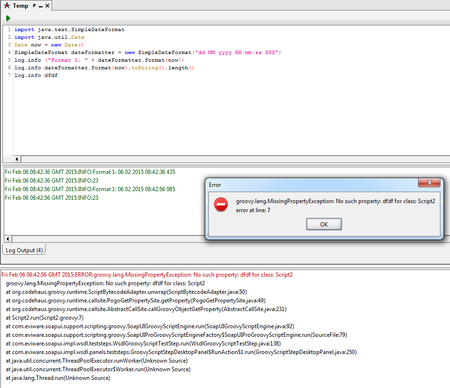
ContributionsMost RecentMost LikesSolutionsRe: How to trace java.lang.NullPointerException error. Hi, Yes I can proceed as it doesn't seem to cause any visible problems and I get the correct results. My issue is why the error log is reporting an error with a variable I no longer use. It isn't found in *any* script I have. It undermines my confidence in the product when it reports false problems. I have discussed this and various other issues with my line manager and we have decided to switch to using JMeter instead so we are no longer going to be using SoapUI Pro and therefore this will cease to be a problem. Thank you so much for the time you have spared me on this issue, it was really appreciated. Regards Gary. Re: How to trace java.lang.NullPointerException error. Hi Rao, Thank you for your continued interest in helping me and your assistance. I was able to reproduce the example you showed easily: By looking at your earlier post I was also able to determine that the error I receive earlier is indicating line 11 of the script is responsible (thank you for helping me find this). However, looking at line 11 in *all* scripts does not reveal a use of the variable mentioned. It only mentions 'Script 1' as the cause and line 11 of this script. Since I have no idea what Script 1 refers to I had to check all my scripts. As I said previously I have done a Find to see where the variable is being used but it is not found in any script I am using. I am totally puzzled. If a variable is not longer in use (as it cannot be found by a Find & Replace) then why does SoapUI keep complaining about it. It doesn't even appear to cause any problems but it is exceptionally irritating to see this in the error log all the time. Regards Gary Re: How to trace java.lang.NullPointerException error. Hi thanks for the replies. I have *never* received an error message like yours where it clearly shows the line number responsible for the error. I've been using SoapUI Pro since around September 2014. I run my tests via a Groovy script. The main script runs on a loop that is on a timer of one hour. Each time that script executes it calls a driver script that runs all the test steps in turn for each test case. It is automated. Even running the scripts manually I never get a line number for the errors and never have done. It's really frustrating. Regards G Re: How to trace java.lang.NullPointerException error. Hi Rao, Thank you for your reply again. Here is another example of how unhelpful I find the messages in the logs. In the SoapUI log I have this error: So I do as it states and look in the error log for the details. That shows this: There are no additional details. I don't have any idea what Script1 is as I have many scripts - why doesn't it refer to the script by the name I have given it? There is no line number anywhere, which would at least help. The variable it is complaining about *was* one I was using but I now no longer use it. I have searched every script individually for the variable in case I have a bad reference but the search string is not found in any script. Saying 'see error log for details' would be really helpful *if* there were some actual details rather than a repeat of what is in the SoapUI log. Do you understand the difficulties this is now presenting me with? I will take a look at Ready API as I'm disheartened with how hard simple debugging is in SoapUI Pro. It is costing me huge amounts of time to track down errors. I really don't want to have to switch products though. Thanks. Gary. Re: How to trace java.lang.NullPointerException error. Hi and thanks for your reply. The OS is Windows 7 Pro 64-bit. SoapUI version is 5.1.2 The steps to reproduce are simply running my groovy script. It occurs several times throughout the script because the script loops through many test cases each of which contain several test steps. I know this may not be particularly helpful as you would need my entire project but my employer very likely won't let me share it due to it being intellectual property. I can ask. I find the user-friendliness of SoapUI to be quite poor especially when it comes to debugging things. It never tells you the script or the line number and this makes debugging nearly impossible. It would be great to have a full IDE within it. Regards How to trace java.lang.NullPointerException error. Can someone please tell me how to debug java.lang.NullPointerException errors? I have an automated solution written in groovy and every so often in the error log I get the line: ERROR:java.lang.NullPointerException. The error does not appear to affect the running of the script but I am really keen to resolve whatever might be causing the problem. I get no other information other than this and the script log gives me nothing extra to go off. There is nothing to tell me what line and in what script the error is occurring, which makes debugging very difficult and time consuming. If someone has experience of debugging issues of this nature I'd be very grateful if they could tell me how to go about determining the script and line responsible. Thank you. Re: [Res] Is there a smarter way of back tracing script errors?Thank you, I will check this. Please mark as resolved.[Res] Is there a smarter way of back tracing script errors?Hi, I have noticed this many times in the past while using SoapUI Pro and wondered if there is a smarter way to troubleshoot the problem. Occasionally when I've amended some existing Groovy script or added new parts and run it through the first execution cycle and error appears in the Script Log pane and takes the format: [ERROR MESSAGE] in Script [X]. Where [ERROR MESSAGE] is the particular text of the error and [X] is the number of the script where the error was encountered. My question is, when there are a lot of scripts the error message, for example, "No such property delay in Script 16" is not very helpful unless I know what script Script 16 refers to. Why doesn't it actually use the friendly name of the script (i.e. the name I have called the Groovy script - "No such property delay in Script Driver" for example) to aid me debugging the problem rather than using an internal reference that takes an inordinate amount of time to track down? I have had to resort to keeping a separate note of which script number refers to which script, which is very protracted for something that should be very simple to implement. Is there an easier way for me to determine what Script [X] is? The Error Log only shows me the exact same message and so is no further help. Thanks.Re: [Re]Access a test steps ID, within TestRunListener.afterStepPERFECT! Thank you for your replies![Re]Access a test steps ID, within TestRunListener.afterStepHi, I need to run a programmatic check to determine if the current test step's index is the same as the test step count value for the current test case. So, for instance, if I have ten test steps and the current test step under execution has an index of five then the test would fail. Only when testRunner is executing the tenth test step would my condition be true. I already have the test step count but what I cannot determine is the index of the current test step under execution. Can anyone help me please? I specifically have to access this from with the TestRunListner.afterStep event listener. Thank you.