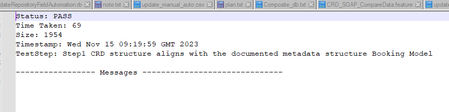
ContributionsMost RecentMost LikesSolutionsRe: how to change test step name when save test results TNeuschwanger Thanks, I tried your code but still not worked,the step name is still not the name what I specified and not replace these special symbols, the test result file is empty as we;; No test result saved in JDBC test cases when save test result in a file Hi, I'm trying to save test results of JDBC cases, but found that in the txt file, response data is not saved, please see the img how can I write more data into test result txt file? how to change test step name when save test results Hi, I'm trying to save test result into a file with following scripts. def pName = context.currentStep.testCase.testSuite.project.name //get project name def pDate = new Date().format( 'yyyyMMdd' )//get current date def sDate = pDate.toString()//convert date to string def pTestSuite = context.currentStep.testCase.testSuite.name//get TestSuite name def pTestCase = context.currentStep.testCase.name//get TestCase name def filePath = 'E:/Data/Dean Ding/CRD files/CRD_results_test/'+pName+'_'+sDate+'/'+pTestSuite+'/'+pTestCase+'/'//compose the folder path File file = new File(filePath) if (!file.exists()) file.mkdirs()//create the destination folder fos = new FileOutputStream(filePath+ testStepResult.testStep.label + '.txt', true) pw = new PrintWriter( fos ) testStepResult.writeTo( pw ) pw.close() fos.close() but as my test step name contains symbols like : , " such special symbols which not accepted when create txt file due to naming convention, as there are more than 1000 cases it will take such long time to change my test step name,I found script to replace those symbols but don't know how to make it change when use above script to save test results. It will be much appreciated if anyone can provide the scripts.