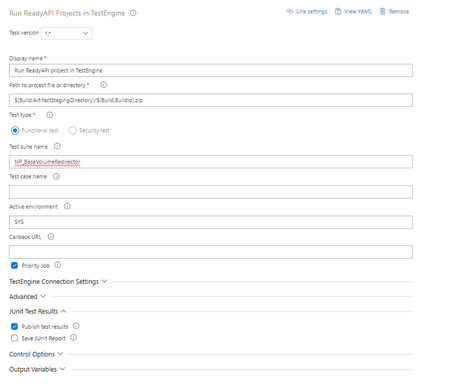
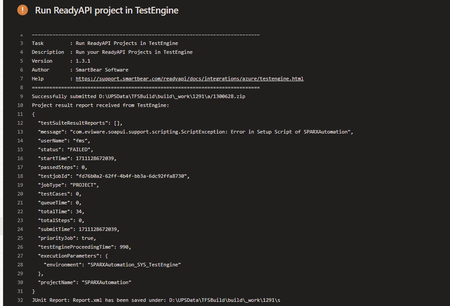
ContributionsMost RecentMost LikesSolutionsRun ReadyAPI Projects in TestEngine I have a groovy script that will be called in every test, placed the script within the repo under ScriptLibrary -> utils folder. Changed the Project Properties -> Script Library to the repo location ( $(System.DefaultWorkingDirectory)\repo name\ScriptLibrary\utils ) The scripts are imported and are running successfully locally but in the Azure pipeline the step where the script is imported it's throwing error. import utils.RetryUtils: org.codehaus.groovy.syntax.SyntaxException: unable to resolve class utils.RetryUtils Run ReadyAPI Projects in TestEngine - task: TestEngine@1 displayName: Run ReadyAPI project in TestEngine env: API_Key: $(SPARX.MIST.GCP.Dev.APIKey) inputs: filePath: $(Build.ArtifactStagingDirectory)/$(Build.BuildId).zip testSuiteName: MIST_Refactor environment: Dev serverUrl: ****** serverUsername: *** serverPassword: ****** continueOnError: true How do I change the email address for a support case. Created a support ticket but gave it incorrect email address, how do I change it? Re: Set-up script works locally but throws an Script exception when running from pipeline - TestEngine nmrao There is no command, we have a task called Run ReadyAPI test in Test Engine that we can use in the pipelines to run the tests, here is the documentation link from SmartBear Run ReadyAPI Tests in TestEngine from Azure DevOps | ReadyAPI Documentation (smartbear.com) ReadyAPI - how to pass more than 1 test case name in the TestEngine Is there a way to run multiple tests from the Test Engine? Re: Set-up script works locally but throws an Script exception when running from pipeline - TestEngine try to launch testrunner from with in ReadyAPI tool and see if the same is the behavior - Nope it is working locally try to provide the absolute path of the token file? if that is not possible, then use project custom property for the token file and pass the file path runtime? Refer -P argument - Is there a way to pass the -P argument from the Run ReadyAPI Projects in TestEngine? If both the above did not help, also try below change i.e., remove runner - This worked atleast the exception is gone but the Token is still not being replaced. This returns the path with backward slashes runner.project.getProject().path, wondering if this is causing any issues? nmrao Re: Set-up script works locally but throws an Script exception when running from pipeline - TestEngine The setup script is at the Project level. Yes, they are. No, I couldn't find any of the log info output in the pipeline. nmrao Set-up script works locally but throws an Script exception when running from pipeline - TestEngine Hello, I have a set-up script that reads an auth token from a file and replaces a Project property. This script work fine locally but throws an exception in Azure pipeline where I'm using ReadyAPI TestEngine to run the tests. The log message isn't helpful. Not sure where and why the exception is thrown, appreciate any help. def tokenFromProperties = runner.project.getPropertyValue("AuthToken") log.info("Current Token from suite properties ---- " + tokenFromProperties ) def projectPath = runner.project.getProject().path //log.info(projectPath) def filePath = projectPath + "/SignedJWT.txt" //log.info(filePath) def myFile = new File(filePath) def myScanner = new Scanner(myFile) def tokenFromFile = myScanner.nextLine() log.info("Token from the text file ---" + tokenFromFile) myScanner.close() //testrunner.testCase.testSuite.setPropertyValue("Token", "test") runner.project.setPropertyValue("AuthToken", tokenFromFile) def UpdatedTokenFromProperties = runner.project.getPropertyValue("AuthToken") log.info("Updated Token from suite properties --- " + UpdatedTokenFromProperties) Test suite fails with error Failing due to failed test step\njava.security.AccessControlException We have recently updated to ReadyAPI 3.49 and noticed that our build pipeline keeps failing, the test pass with 100% success rate but I see there is suite level failure with error Failing due to failed test step\njava.security.AccessControlException: access denied (\"java.util.PropertyPermission\" \"*\" \"read,write\") We rolled back to an older version and that fixed the issue. CI/CD Pipeline - Access Token from data source is not being replaced when the test runs in pipeline Hello, I'm trying to run a test from Azure pipeline and noticed that the Bearer token from a data source is not being replaced with the right value, the test work locally. Few notes, Token is being generated and stored in a text file. Within the test added a test step to import the data source and referenced it in Access token section This is what I see in the pipeline in the request header