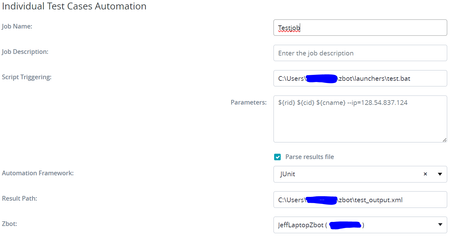
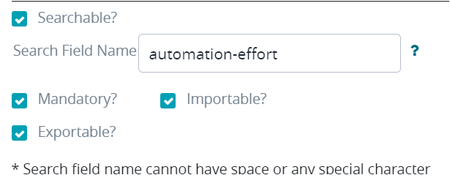
ContributionsMost RecentMost LikesSolutionsRe: All Test Steps for testcase randomly deleted Correction. Just saw it at least 5 times today. Always seems to be multiple testcases in a row in the test plan (not numerically adjacent. Adjacent in-order after rearrangement). Not sure what's causing it, but it's incredibly inconvenient. Already cost me over a half-hour today, and that's only because we had just exported the entire test plan the day before for approval/documentation purposes. If we hadn't, it would have taken a lot longer to restore the missing steps. Edit. Way over 5 times today. Up around a dozen. Something obliterated an entire subfolder of testcases that I just finished triple-checking yesterday. All Test Steps for testcase randomly deleted We've seen this happen 4-5 times recently. We go to update/manage a testcase only to find the testcase's steps have been deleted. Refreshing does nothing. Clearing the cache does nothing. The steps are just gone and we have to re-write them from scratch. This is recent. Only noticed it happening 2-3 weeks ago but it seems to be getting worse. Re: Python PIP support Okay, I think part of the problem is that TestComplete juggles two of its own environments, and then doesn't tell you which one its going to use when it does things. For example, if you run recorded UI tests, it uses one of the locked down environments in the TestComplete/(x64 optional depending on OS)/bin/Extensions/Python/Python311/Lib directory. However, if you try to run a test through a UnitTesting/PyUnit testing unit in your project, it's actually going to use one of your system's default execution environments. As far as I can tell, none of this is configurable in TestComplete except for x86 vs x64 with recorded UI tests, and that's simply based on what OS you're running. Examples of what I mean: If I create a function in a script unit and right-click and select "run this routine", it's going to run it using one of the locked down environments (x64 in my case) through TestComplete.exe. If I create a UnitTest directory, then add a pyUnit test and run it, it's going to use my system's default python environment (and it's not going to tell me). At the very least this is confusing and cannot be configured (our product's execution environment is built on top of Anaconda, and my laptop has roughly 9 python execution environments on it, not counting the two that TestComplete creates). As it stands, pyUnit runs are using environment #3 on my system...out of 9...with no reason given and no apparent way I can find to tell TestComplete which one to use. Honestly, I would prefer to either define individual project and subproject virtual environments (that would be the best outcome, by far), or at least be able to tell testcomplete which system env to use when running unit tests through an entry in one of the setting menus (assuming not running them through the TestComplete exe isn't a bug in the first place). At the very least, at that point I wouldn't have to worry about the execution environment randomly changing whenever I need to make a new system environment with anaconda. Python PIP support Give us some kind of interface for the pip installed in the TestComplete python environment. I'm not sure how or why you thought that nobody would ever need to install external packages to write tests, but that's not how anything works. I've got a medical instrument that runs MongoDB, and I need to access that database to do a variety of things such as... Environmental setup (need to set up collections so that the UI looks a certain way and everything is where I expect it to be) Test setup (need to insert documents to make changes to and remove extraneous information so the entries I need for my tests to run are where I expect them to be in the UI) Test teardown (need to clean up after myself) Test sanitization (need to clean up after myself) Assertions (the UI is data-driven and the data is in the DB) etc. Additionally, because we have security to worry about, AND we use a client-server design, I need to use an SSH Tunnel to access the MongoDBs installed on slave machines to test and make sure that data is being written correctly across multiple points of possible failure (the alternative is to open the firewalls on the slave machines, but there are multiple people who want me to figure out a different way). I cannot write these tests without installing additional python libraries. Help me install additional libraries into the TestComplete python environment. I mean, the TestComplete python directories aren't even writable by a system administrator without editing the security settings. That alone means you have to do it for me. Add .MD (markdown file) support I would like to be able to define a simple README.MD file (or whatever.MD) in a project or folder location in a project to provide documentation for other developers and/or future me. Currently I have to use a script file to do this and I don't like creating empty script files just to provide myself with module-level documentation. Trouble mapping execution to testcase I have a simple testcase that contains the following: def testTest(): assert False A batch file to run the test that contains the following: @echo off title Test batch script pytest --junitxml=c:/Users/----/zbot/results/test_output.xml c:/Users/----/projects/REVEAL-Automation-Tests/1.2.5/HL7/LabConnectors/TestConnectorConfig.py echo TESTING ALL THE THINGS!!! A Vortex Script Automation entry that looks like this: And I'm executing a testcase using it like so... Zbot is started on my local system with the following command: zbot_start.bat > runlog.log 2>&1 ...and I just load runlog.log into a log viewer to keep things readable. The execution gives the following feedback from zbot WARNING: No execution is mappped with parsed testcase. Sep 14, 2023 4:46:21 PM com.thed.launcher.ScriptProcessor run What step or format am I missing that helps map my unittests to specific testcases in Zephyr? I've been pouring over zephyr's documentation for hours and I can't find anything. These are just supposed to be fairly vanilla UnitTests. The testcase in question is just checking the contents of a JSON file, and another one in this group is just verifying that an installer isn't installing a few DLL files that we removed from our system. Re: Issue importing testcases with multiselect fields Both are marked as importable. Issue importing testcases with multiselect fields I've got about 900 testcases that I'm trying to import into Zephyr, and some of the fields we have are "Picklist" types (dropdown menus). The import process is not properly capturing the values from the XLSX file and is leaving them un-selected instead of setting the values. The values in the excel file match the values in the Zephyr dropdowns character for character. I've triple checked. I've also tried translating the values to their Zephyr IDs and that didn't work either. What do I have to do in order to get these fields to import properly? Should be able to set vortex to watch buckets on S3 We use AWS S3 to store a lot of our data. It would be great if we could set Vortex to watch an S3 bucket or a sub-folder in a bucket with an S3:// folder path after setting up some AWS credentials.