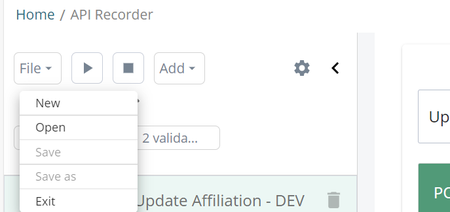
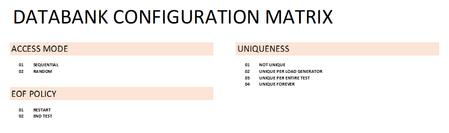
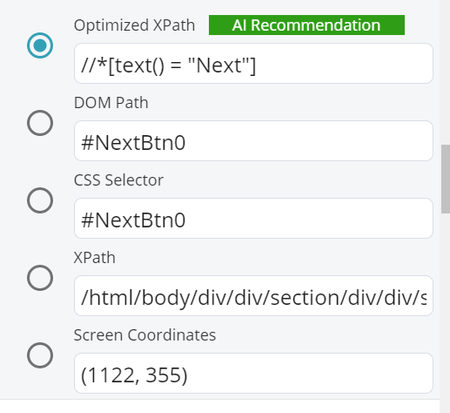
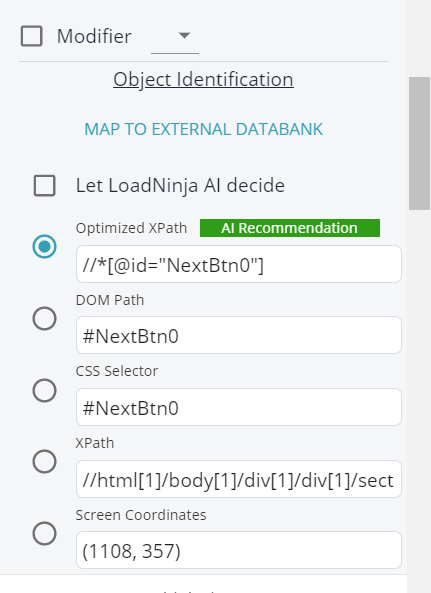
ContributionsMost RecentMost LikesSolutionsAPI Script - Save and SAVE As are disabled for me. Hi Team, Before I was able to save API script in Load Ninja, however currently I am not able to save as those options are disabled. thanks, Mary Tsapa When is New databank configuration going to be available? The Configuration matrix that has been requested is: How I can see data that I used in this test included in the report? ( Data bank in the report) How I can see data that I used in this test included in the report? ( Data bank data in the LoadNinja report) Re: Unable to recognize a button in LoadNinja Hi Marco, Button is disabled dynamically, and I figured the solution by clicking twice on that page anywhere (dummy click). Thanks for reaching out to me. Object recognition is not an issue in this case. Re: Unable to recognize a button in LoadNinja Hi TimeCop1983 I tried this as well and it did not work. Is it possible to join meeting to solve this? I can send you meeting link with your feasible timings. Please let me know, appreciate your help on this. thanks, Mary Re: Unable to recognize a button in LoadNinja No TimeCop1983 I tried with the same steps but still script is unable to recognize Re: Unable to recognize a button in LoadNinja Hi, yes this is the only unique property that I found. where can I place it? Please let me know custom expression that LoadNinja can take it. Unable to recognize a button in LoadNinja Hi, Currently, I am facing object recognition issue with “Next” button on a web page where I am recording. I've been able to record a script. I have tried various Object Identification options but still cannot successfully play back my script to completion. Next button has same CSS Selector and same id values across different pages. Only unique identification is ownerDocument.firstElementChild.innerText Please assist us, thanks, Mary Solved