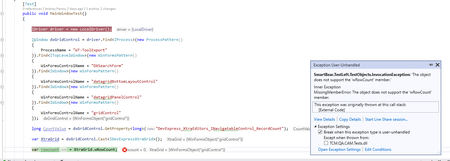
ContributionsMost RecentMost LikesSolutionsVS2022 and .NET7-8 Support for development Hi, As I see on Introducing TestLeft | TestLeft Documentation (smartbear.com), TestLeft supports VS 2019 and .NET5, but .NET 5 has reached end of life, meaning it is no longer supported (see Download .NET 5.0 (Linux, macOS, and Windows) (microsoft.com) Do you have plans to support VS2022 and .NET7-8 for development? Re: How to cast custom controls as DevExpressXtraGrid controls Hi dermotcanniffe, Thank you for the answer, but I found a more correct way to solve my problem: var Driver = new LocalDriver(); var className = "DXSearch.DxGridView.DxGridControl"; // Get the Developer Express Controls Controls category var DExpressControls = Driver.Options.ObjectMapping["Developer Express Controls"]; // Get the WinForms category var winFormsControls = DExpressControls["WinForms"]; // Get the list of classes mapped to the XtraGrid control var XtraGrid = winFormsControls["XtraGrid"]; // Map a custom class to the XtraGrid control XtraGrid.AddClassName(className); How to cast custom controls as DevExpressXtraGrid controls How to cast custom controls as DevExpressXtraGrid controls? I try to write the following code: IDriver driver = new LocalDriver(); IWindow dxGridControl = driver.Find<IProcess>(new ProcessPattern() { ProcessName = "WT-ToolExport" }).Find<ITopLevelWindow>(new WinFormsPattern() { WinFormsControlName = "DXSearchForm" }).Find<IWindow>(new WinFormsPattern() { WinFormsControlName = "datagridBottomLayoutControl" }).Find<IWindow>(new WinFormsPattern() { WinFormsControlName = "datagridPanelControl" }).Find<IWindow>(new WinFormsPattern() { WinFormsControlName = "gridControl" }); long CountValue = dxGridControl.GetProperty<long>("DevExpress_XtraEditors_INavigatableControl_RecordCount"); //this returns correct value var XtraGrid = dxGridControl.Cast<IDevExpressXtraGrid>(); var rowcount = XtraGrid.wRowCount; // I see error I see wRowCount property for this control in TestComplete :