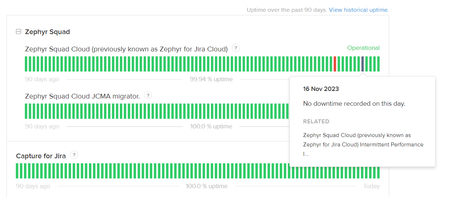
ContributionsMost RecentMost LikesSolutionsRe: All data of test cases are not exported Yup, it's useless. :| Re: Test Steps Comment in the Test Execution Hi Marie! Did you ever figure out how to do this? It is something I am interested in, as well. TIA, - Jen Re: Always Down Ha ha - hey look! GREEN for 11/16 and 11/17! It's a miracle! We must have just been imagining things 😄 https://status.zephyr4jiracloud.com/ Re: Still unable to import test cases FYI - Zephyr was down for a while on Thursday 11/16 and I'm sure there were probably still residual issues on Friday 11/17. We reached out to customercare@smartbear.com and did receive a response, so try that next time as there often isn't a Smartbear rep in these threads. Good luck, it's Monday! 🙂 - Jen Re: Always Down And how embarrassing is it when I have my 1:1 with my manager and I try to tell him our timeline slipped due to Zephyr being down/too slow to use and looking at the status page everything is green! 😬 AWKWARD Re: Always Down Came here because Zephyr is down, and I thought this was a message from today 😂 Hang in there, friends! Re: Zephyr Squad app shows error as "504 Gateway Time-out" Yup, Zephyr is DOA for us, as well. Re: Sorting tests for execution in a folder Glad I could help with a workaround! There are so many small things that I would do to this application to make it more user friendly. Re: Sorting tests for execution in a folder That's right, the Labels don't really do anything when it comes to sorting. We are using the Components field for that as you can sort that column in the test cycle view. Re: Sorting tests for execution in a folder This is a consistent issue for us, as well. The issue with Labels is we will use multiple so we can set up custom searches, but when you have more than one Label they appear in the order they were added so sorting a test cycle using them doesn't work very well for us. The best we've been able to cobble together is adding a single Component to each test case, and then each summary starts with an abbreviation for the component and a number to determine the order. For instance one Component might be "User Reports" and the test case Summaries are UR.1, UR.2, UR.3, etc. Then we can at least sort by Component and then eyeball the list to know which test cases to run in which order. Not at all an elegant solution as adding new or deprecating old test cases results in some creative naming (UR.2a, UR.2b, etc.) but it gives us some ability to sort.