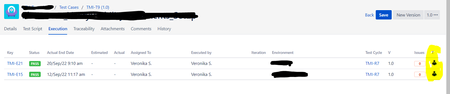
ContributionsMost RecentMost LikesSolutionsRe: Always "Manual execution" in execution overview and report: how can I change this value? Thank you for your answer. I'm afraid, it is as you say. I had hoped that there would be a way to manipulate this manually by now. Many of the test machines can't be run in a network. The data is entered manually into Zephyr Scale, but was collected automatically. The "manual" specification in the tests is therefore simply wrong and cannot be corrected manually. This is not so tragic because the excel sheet is only a backup document. What is SIGNIFICANTLY worse is that customised fields, which contain really essential information, are not shown in the PDF reports, in which the screenshots are also visible next to the test steps (some information you do not have in the excel sheet.) So there is NO test protocol that contains ALL data... This is indeed a problem. Re: Always "Manual execution" in execution overview and report: how can I change this value? Is there any answer by now? Re: Zephyre Scale Report all fields It would be really important to have all the fields in the report - especially the ones I have created myself. For some of the predefined fields, I would prefer to be able to hide them because I don't need them ... Always "Manual execution" in execution overview and report: how can I change this value? In TestCase / Tab "Execution" In Report "Test execution results (detailed)" How/where can I manupulate this value? I want to switch to "Automated execution" for some TestCases.