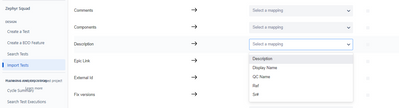
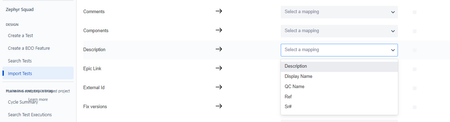
ContributionsMost RecentMost LikesSolutionsIssue with test import in Zephyr Squad Trying to import the test cases through Zephyr Squad. Setup: 1. Import the *.xls file. 2. Click on Next Settings: 1. Row number to begin import * - selected the appropriate value 2. Discriminator - selected the appropriate value 3. Selected import all sheet radio button 4. Click on Next Mapping: Description - I was expecting the row header name as mentioned in the *.xls values but I see the below options which is not atall the part of the *.xls file. Please let me know if anyone has faced this issue or by any chance their is a way to resolve this. Unable to map fields when trying to import the *.xls file in Zephyr Squad Trying to import the test cases through Zephyr Squad. Setup: 1. Import the *.xls file. 2. Click on Next Settings: 1. Row number to begin import * - selected the appropriate value 2. Discriminator - selected the appropriate value 3. Selected import all sheet radio button 4. Click on Next Mapping: Description - I was expecting the row header name as mentioned in the *.xls values but I see the below options which is not atall the part of the *.xls file. Please let me know if anyone has faced this issue or by any chance their is a way to resolve this.