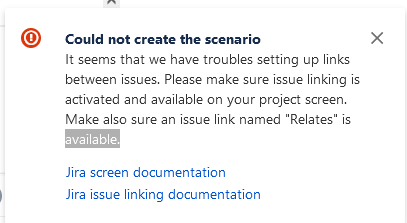
ContributionsMost RecentMost LikesSolutionsRe: How to change the project and issue type when I click on Create Zephyr Test If you are using Zephyr Squad, after you click "Create a Test", a create screen will pop-up. Within the pop-up you will "Project" drop-down, that is where you can change as this issue below to which project. then you will see "Issue Type" drop-down, that is where you can change issue type. How to enable and make sure an issue link named "Relates" is available in the project screen I only find out that there is a new feature BDD in Zephyr Squad. I followed the steps within the help documentation, but I running into an issue! The issue is that none of us able to create "Scenario" in BDD field (in JIRA). We read the pop-up error message, but the links within the message leaded us to no where. Can some one point us out to as where we can enable and use BDD feature? here is the screenshot of error message: How to import/move test cases with Zephyr Squad projects Hello all, How does one import/move test cases with Zephyr Squad projects? Thanks