
ReadyAPI-POST Request- Implement dateTime script in all teststeps
- 5 years ago
So, aaronpliu thanks for your information. Meanwhile I've tried it a different way. But it's not completely OK yet. I will place my solution here and create another ticket for the next issue. 🙂
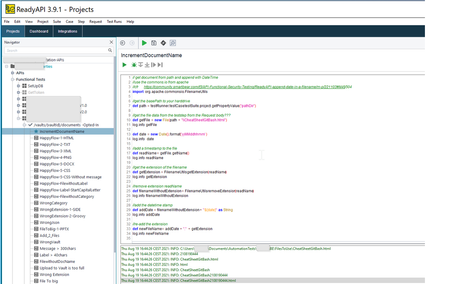
So the groovy script will fetch the file from a folder within ReadyAPI project called "FilesToUse". From there on it's going to depict the name of the file: get the name of the file, delete the extension, adding datetime with a separator "-" and adding the extension again. That works allready.
// get document from path and append with DateTime
//use the commons.io from apache
//cfr     https://community.smartbear.com/t5/API-Functional-Security-Testing/ReadyAPI-append-date-in-a-filename/m-p/221103#M49504
//cfr Joost De Geyndt
import org.apache.commons.io.FilenameUtils
import groovy.json.*


//get the basePath to your harddrive
def projectpath = context.expand( '${#Project#projectpath}' )
//get the folder with files in your composite folder
def path = projectpath +  File.separator + "FilesToUse"
log.info path

//create a new arrayList to put all the files in it
ArrayList<File> files = new ArrayList<>();
File directory = new File(path);
File[] fList = directory.listFiles();

int filesInFolder =  fList.size()
//get all the  files  from harddrive with an iteration
int iteration = 1
for(File file : fList){

	/*
	*****************************Generate file with DateTime stamp
	*/
	//generate datetime
	def date = new Date().format('yyMMddhhmm')
	log.info  date

	//read filename
	def readName = file.getName()
	log.info readName

	//get the extension of the filename
	def getExtension = FilenameUtils.getExtension(readName)
	log.info getExtension

	//remove extension readName
	def filenameWithoutExtension = FilenameUtils.removeExtension(readName)
	log.info filenameWithoutExtension
	//filenameWithoutExtension.replaceAll("^[\\d]+", "")     ---Not working
	//filenameWithoutExtension.replaceAll("[0-9]", "")       ---Not working
	def addDate = filenameWithoutExtension + "-" +  "${date}" as String
	log.info addDate


	//re-add the extension
	def newFileName = addDate + "." + getExtension
	log.info newFileName
	/*
	***************************End DateTime****************************************
	*/
	file.renameTo(path + File.separator + newFileName)
	//encode in base64
	def base = new File(projectpath + File.separator + "FilesToUse"+  File.separator + newFileName).getText('UTF-8').bytes.encodeBase64().toString()
	//to be able to see which file contains wich extension (for more ease of point in the RequestBody) add the extension in the description
	testRunner.testCase.setPropertyValue("newFileName_"+ getExtension, base)
	iteration++

}
I have 2 files in the folder for testing purposes. The response looks like this:
In the body of the teststep (that is a POST request) I'm getting the result like this:
"document": "${#TestCase#newFileName_html}",Running this TestSuite once is excelent. But now I've got issues that for each run it's adding that dateTime, and resulting in
So next ticket will be linked to this.
TBD
Kind regards,
AAB

