Forum Discussion


TNeuschwanger Champion Level 3
2 years agoChampion Level 3Hello htereshchenko
What seems to be the problem? Do you get some error message that states you could not dump a response file? What is your dump file and where did you specify it?
There are a few locations on a response for a "dump" file... Right clicking in the "JSON" tab of the response allows you to "Save as..." Is that what you consider a dump file? Right clicking in the "http log" along the bottom of the generally available tabs yields an "Export to File" menu item. Is that what you consider a dump file? We can advise with a little more help from you on where you specified the dump file at.
Running your test from a command line will produce a file of request/response for every RESTfull request in the test that is run. You could consider those a dump file.
Those are the locations for dump files that I can think of. Whenever I need a dump file, I choose to write a groovy script that takes the response (or raw response) and write it to a file...
def response = context.expand( '${HTTP Request Step#Response}' );
log.info "response=>" + response.toString() + "<";

{write response string to file}
Regards,
Todd

htereshchenko
2 years agoNew Contributor
Thank you for the quick turnaround on my request, Todd.
My dump file is "ValuationResponse.txt" located at H:\Downloads and I specified it in the In the "Request Properties" panel window scroll down to the property "Dump File" property of the he "Request Properties" panel. So, my expectation is that upon executing the test cases comprising the Rest request where "Dump File" property is specifies, the full response (being displayed in the Raw view on the Response panel) will be saved to the file "ValuationResponse.txt".
But it's not the case and the file "ValuationResponse.txt remains empty.
See attachment,
Regards,
Hennadiy
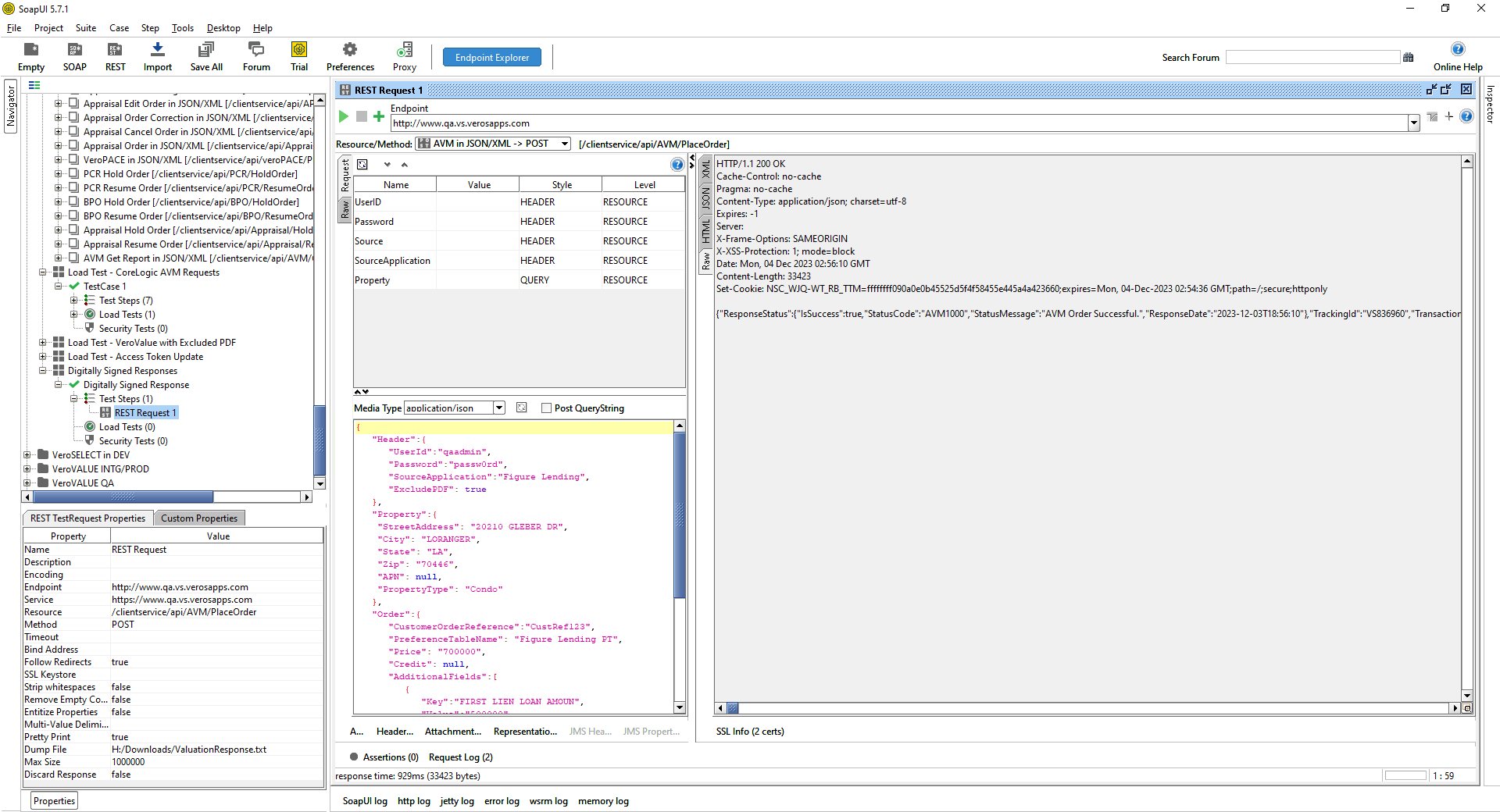
- TNeuschwanger2 years ago
Hello htereshchenko
Sorry, I could not reproduce the non population of a dump file...
I updated to the latest version of SoapUI (5.7.2).
I specified a dump file for a REST Request
I executed the test step that was the REST Request
I got content in the file that I specified as the dump file (json response only, not the whole content of the raw tab).
The only thing I noticed that was different from your picture is that the Encoding in the Request Properties is UTF-8. Also, Max Size was 0 instead of 1 million. When I removed UTF-8 and set Max Size to 1000000, I still got output to file. 😞
Are you sure you have write capability to the drive and folder you specified? Maybe try a different folder and see what happens. Also see if anything displays in the SoapUI log or error log that could shed some light on why data is not written.
Sorry I could not help your situation.
Regards,
Todd
- htereshchenko2 years agoNew Contributor
Thank you for the quick turnaround on my request, Todd,
I will follow you advise and double check all the settings and permissions. Whoever, if the Dump File saves the only JSON payload , it is not what I need. What I need is to have saved the whole response including the headers not the only JSON payload, and it looks like I found out how to get it saved as a file. The thing is that the whole response is captured in the Test Case HTTP Log and it can be exported to a file by using the "Export to File" command available in the popup menu.
Should I need further help, I will reach out to again. Thank you so very much for your time and effort,
Best regards,
Hennadiy