Soapui equivalent for curl -F (multipart/form-data)
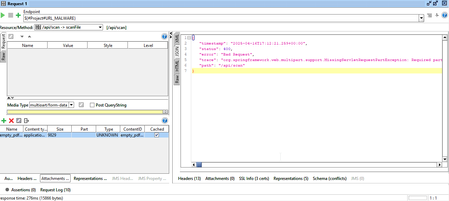


To integrate your `curl -F file=@...` command into SoapUI for binary file uploads, go to the **"Attachments" tab** of your REST Request. Add your file and, most importantly, in the **"Part" column** for that attachment, enter **`file`**. Ensure the "Type" is correct (`application/pdf`) and the request's "Content Type" is `multipart/form-data`. This explicitly names the file part as expected by your API, resolving the "Required part 'file' is not present" error.

Thx for your reply, the "part" and "Type" fields in the grid are not editeable :/