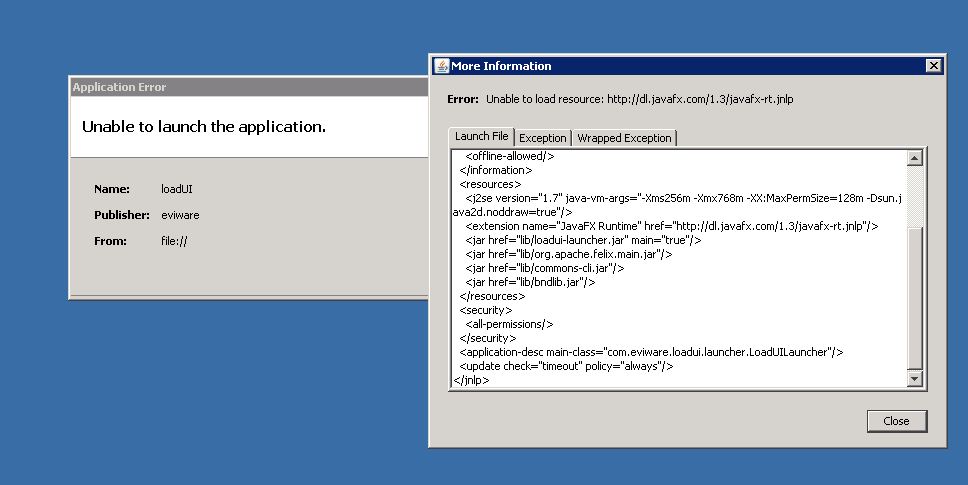
I solved this problem.
Do follwing Steps:
1. Download manually javafx-rt.jnlp file and place it in loadUI installation folder (ie.C:\Program Files\SmartBear\loadUI-2.1.1)
2. Open loadUI.jnlp file. This file already present in your installation folder. Edit this file by changing the line
<extension name="JavaFX Runtime" href="
http://dl.javafx.com/1.3/javafx-rt.jnlp"/> with <extension name="JavaFX Runtime" codebase="file:." href="javafx- rt.jnlp"/>
3. Open javafx-rt.jnlp file and check what are the jars required according to your OS and download that jars manually.
4. Place downloaded jars into lib folder (ie. C:\Program Files\SmartBear\loadUI-2.1.1\lib)
Ex. Windows require following jar files
i. javafx-rt-windows-i586__V1.3.1_b101.jar
ii. javafx-rt-lazy-windows-i586__V1.3.1_b101.jar
iii. javafx-rt-fonts-windows-i586__V1.3.1_b101.jar
iv. javafx-rt-natives-windows-i586__V1.3.1_b101.jar
v. jmc-natives-windows-i586__V1.3.1_b101.jar
5. Now edit javafx-rt.jnlp with following code.
This code is for windows OS
<?xml version="1.0" encoding="UTF-8"?>
<jnlp spec="1.0+" version="1.3.1_b101" codebase="file:." href="javafx-rt.jnlp">
   <information>
      <title>JavaFX Runtime</title>
      <vendor>Oracle Corporation</vendor>
      <offline-allowed/>
   </information>
   <security>
      <all-permissions/>
   </security>
   <update check="background"/>

   <resources>
      <jar href="lib/progressbar__V1.3.1_b101.jar"/>
   </resources>

   <resources os="Windows">
      <jar href="lib/javafx-rt-windows-i586__V1.3.1_b101.jar"/>
      <jar href="lib/javafx-rt-lazy-windows-i586__V1.3.1_b101.jar"/>
      <jar href="lib/javafx-rt-fonts-windows-i586__V1.3.1_b101.jar"/>
   </resources>

   <resources os="Windows" arch="x86">
      <nativelib href="lib/javafx-rt-natives-windows-i586__V1.3.1_b101.jar"/>
      <nativelib href="lib/jmc-natives-windows-i586__V1.3.1_b101.jar"/>
   </resources>

   <resources os="Mac OS X">
      <jar href="javafx-rt-macosx-universal__V1.3.1_b101.jar" size="1229513" part="javafx-rt" download="eager"/>
      <jar href="javafx-rt-lazy-macosx-universal__V1.3.1_b101.jar" size="221529" part="javafx-rt" download="lazy"/>
      <jar href="javafx-rt-fonts-macosx-universal__V1.3.1_b101.jar" size="155282" part="javafx-rt" download="lazy"/>
   </resources>

   <resources os="Mac OS X" arch="ppc">
      <nativelib href="javafx-rt-natives-macosx-universal__V1.3.1_b101.jar" size="486786" part="javafx-rt" download="eager"/>
   </resources>

   <resources os="Mac OS X" arch="i386">
      <nativelib href="javafx-rt-natives-macosx-i386__V1.3.1_b101.jar" size="224644" part="javafx-rt" download="eager"/>
   </resources>

   <resources os="Mac OS X" arch="x86_64">
      <nativelib href="javafx-rt-natives-macosx-x86_64__V1.3.1_b101.jar" size="243787" part="javafx-rt" download="eager"/>
   </resources>

   <resources os="Linux">
      <jar href="javafx-rt-linux-i586__V1.3.1_b101.jar" size="1089958" part="javafx-rt" download="eager"/>
      <jar href="javafx-rt-lazy-linux-i586__V1.3.1_b101.jar" size="221638" part="javafx-rt" download="lazy"/>
      <jar href="javafx-rt-fonts-linux-i586__V1.3.1_b101.jar" size="155272" part="javafx-rt" download="lazy"/>
   </resources>

   <resources os="Linux" arch="i386">
      <nativelib href="javafx-rt-natives-linux-i586__V1.3.1_b101.jar" size="422337" part="javafx-rt" download="eager"/>
   </resources>

   <resources os="Linux" arch="x86">
      <nativelib href="javafx-rt-natives-linux-i586__V1.3.1_b101.jar" size="422337" part="javafx-rt" download="eager"/>
   </resources>

   <resources os="SunOS">
      <jar href="javafx-rt-solaris-i586__V1.3.1_b101.jar" size="1079380" part="javafx-rt" download="eager"/>
      <jar href="javafx-rt-lazy-solaris-i586__V1.3.1_b101.jar" size="221687" part="javafx-rt" download="lazy"/>
      <jar href="javafx-rt-fonts-solaris-i586__V1.3.1_b101.jar" size="155270" part="javafx-rt" download="lazy"/>
   </resources>

   <resources os="SunOS" arch="x86">
      <nativelib href="javafx-rt-natives-solaris-i586__V1.3.1_b101.jar" size="189894" part="javafx-rt" download="eager"/>
   </resources>
   <component-desc progress-class="com.javafx.progressbar.ProgressManager"/>
</jnlp>
(NOTE: u have to change the resources tag according to your OS)
6. Now start loadUI app.
Regards,
Raosaheb