Solved
Extract nested JSON response values in DataSource for JSON - how to export to file / excel?
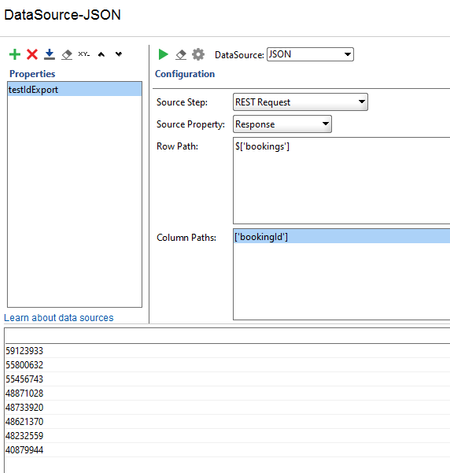


Richie, nmrao, thank you for your help!
Hi davecoleman ! Were you able to solve this? Please share your solution with the Community if you were.
Otherwise, please either provide nmrao with the info they are requesting or, alternatively, contacting support can bring clarity to this, as well.

thanks richie . ill do some work on this and report back....
Hi,
So I've used JsonSlurper to view the response and have extracted the related records to the Log.
Now how do I pass each into an array / list to export via the Datasink?
import groovy.json.*
import groovy.util.*

def json='[{    "message" : "Success",    "bookings" : [       {          "bookingId" : 60002172,          "bookingDate" : "1900-01-01T00:00:00"       },       {          "bookingId" : 59935582,          "bookingDate" : "1900-01-01"       },       {          "bookingId" : 53184048,          "bookingDate" : "2019-01-15",          "testId" : "12803798123",          "overallScore" : "PASS"       },       {          "bookingId" : 53183765,          "bookingDate" : "2019-01-15T13:45:00"       },       {          "bookingId" : 52783312,          "bookingDate" : "1900-01-01"       }    ] } ]'

def response = context.expand( json )
def parsedjson = new groovy.json.JsonSlurper().parseText(response)
log.info parsedjson
log.info " Count of records returned: " + parsedjson.size()
log.info " List of bookingIDs in this response: " + parsedjson.bookings*.bookingId
Any pointers would be appreciated. I could also work with exporting the list here on each iteration of the loop to a CSV file. but it would be good to know how a property could be created to use.

 Alumni
Richie, nmrao, thank you for your help!
Hi davecoleman ! Were you able to solve this? Please share your solution with the Community if you were.
Otherwise, please either provide nmrao with the info they are requesting or, alternatively, contacting support can bring clarity to this, as well.