Forum Discussion


hardik043
8 years agoOccasional Contributor
I am also having same question.
When i create a Test case in any test suite for new end point, in background it creates a folder named "REST-Service-XX". where XX is incremental number as attached screenshot.
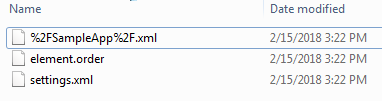
This folder contents settings.xml and element.order as attached screenshot.
So, when i create a test case i am giving a name of the test case like "VerifyGetStudentDetail" but when i explorer the project folder it creates a folder named "REST-Service-XX".
I want the folder to be created with the same name as i give to test case. In above case it should be "VerifyGetStudentDetail".
So, Is there any configuration where i can set similar behaviour.
Thanks,
Hardik
- avidCoder8 years agoSuper Contributor
Could you please tell me the folder path where REST-Service-XX is getting generated? So, that I could see the same in my PC.
- hardik0438 years agoOccasional Contributor
I have created a test case with name "Sample Test" and then i have added one step "REST Request". It's name is "GetStudentData".
While adding "REST Request" step i have created a new request as above.
Now. "REST Request" step is created successfully. Now when i check my project in file explorer it creates a folder named "REST-Service-12" and inside this folder i see below files.
My question is folder name "REST-Service-12" is not intuitive for me. So i need to rename it manually.
Could you please advice me on this.
Thanks,
Hardik
- avidCoder8 years agoSuper Contributor
Hey, I also followed your steps and added REST request. I do not see any kind of REST-Service-XX folder getting generated. I see .xml file after I save it. You can use this REST request and check whether this also is generating REST-Service-XX folder inside file explorer. Here is URL for REST - http://del.icio.us/api/:username/bookmarks/:hash and Method is GET.