We are building a new experience for our SmartBear Community.
This site is now read-only. You can still browse and search as usual. Learn More
This site is now read-only. You can still browse and search as usual. Learn More


Hi ZP,
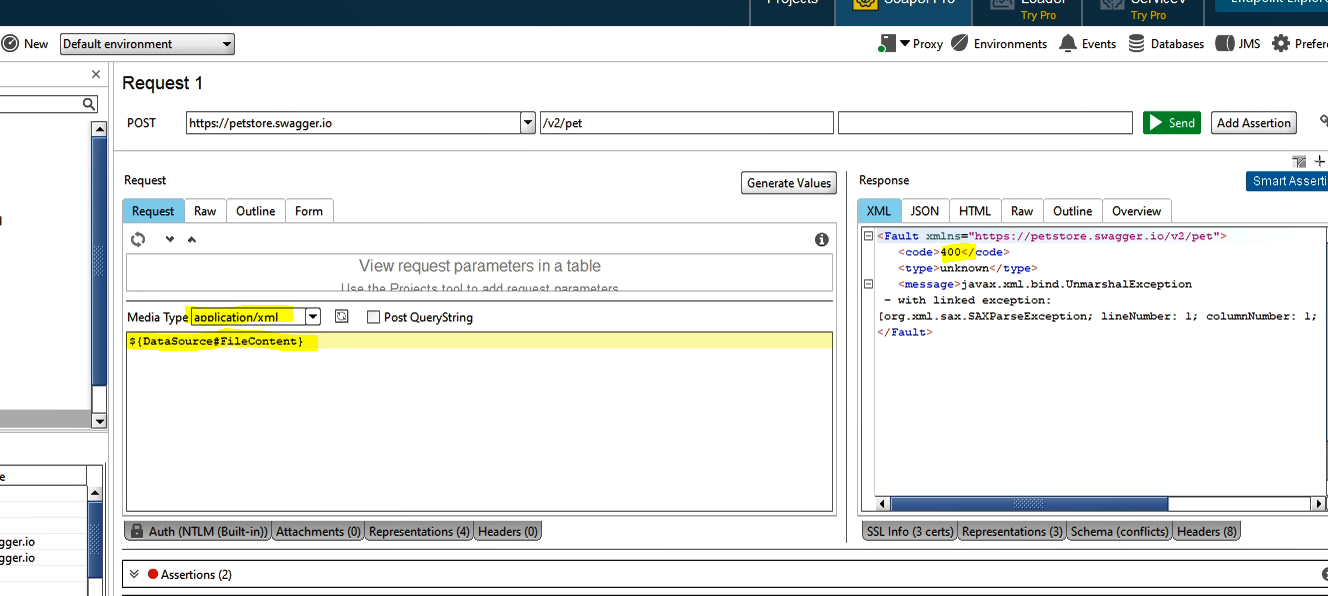
The Media Type of the request matters - it should be `application/xml`.
On my side, your scenario with a sample Petstore project works fine. My project and a video showing how I run it are attached.
Let me know if this helps.
In my example it should be as below which i am picking up from right click>>Getdata so its automatic. I am not changing the names or anything and i have tried test again. It is failing with the same exact errors i have posted previously. Does the value of Media Type down matter? I have tried with multiple dorp downs though.
${DataSource#fileContents}
Any solution to this problem?
 Staff
StaffHi ZP,
The Media Type of the request matters - it should be `application/xml`.
On my side, your scenario with a sample Petstore project works fine. My project and a video showing how I run it are attached.
Let me know if this helps.
Hi NBorovykh
Natalie - I need to apologise - I've been stuck in bed for a week and a half and never got around to what I intended. what i understood the problem to be was that the fileContents property (which was the property on the datasource step) wasn't being picked up correctly - so nothing was getting passed to the REST step - whether the Mediatype is correct or would just mean the endpoint ZP was posting to would just respond with a 400 due to a bad request - but he never said that - he said the property wasn't being passed to the REST step.
Im back in work for the first time today - once I get home - I'll create a working project (using XML) for @ZP to copy.
Cheers,
rich
That's all good now. Solution has worked. I found that on my directory step i had the slashes the wrong way. It is working fine now...