Originally posted by BD_Geoactive on October 17, 2025
Hello all,
I am trying to figure out if I can write a script to try and select an item in a tree view object. Unfortunately, the tree view in question doesn’t have SelectItem()/ClickItem() methods in it.
when looking at the Object Browser, the Tree in question is a VLCNETObject. So this is where i though i can write a simple experimental script (python) to see if i can find the ‘child’ of the object. but to no avail
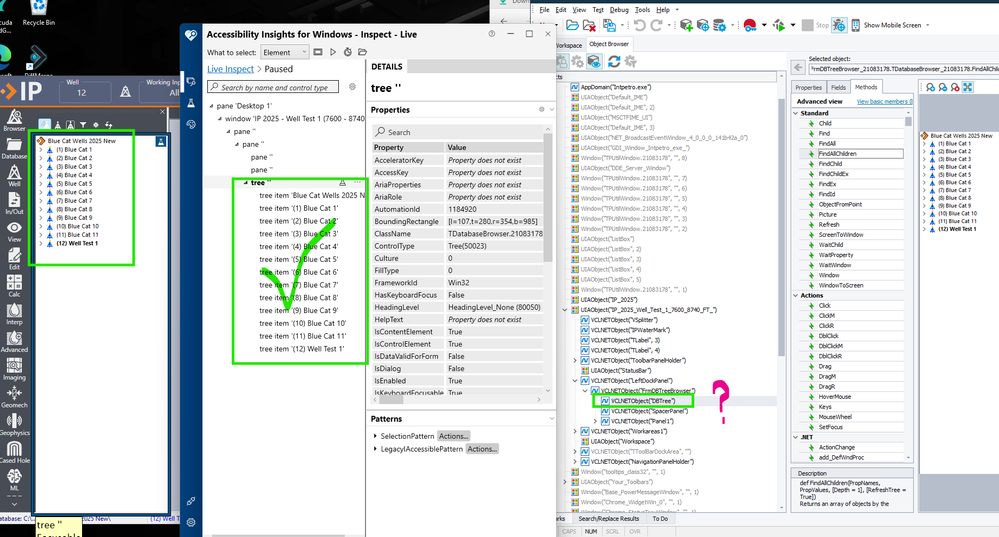
I have set the screenshots below to show the application’s treeview and what i can see via Accessibility Insight - see image 0.png
The simple script I have is basically go find the treeview object in question and use the method FindChild and if found click on it.
Advise seeked: if this kind of components that dont have ClickItem() or SelectItem for treeview, how can i go about it in test complete without using the OCR action?
Any help is much appreciated. note: i am no developer
I’ll have a go at this. Have you inspected the treeview object parent for properties or methods that can be used to interact with it? In many cases I have found the parent object has properties and methods for navigation the child objects don’t have. I’ll do some poking around with the info you have shared (nice btw) and see if I find anything.
… If you find my posts helpful drop me a like! Be sure to mark or post the solution to help others out and/or to credit the one who helped you.
… OK, this is object is exposed through Microsoft UIA, that is apparent. I found you may have success from the parent object looking for methods related to nodes like, GetFocusedNode() and ExpandAll() / CollapseAll() There may be similar methods or indexes you can use to navigate and focus objects in the tree. I have a similar tree view in an app I have written tests for a few years ago.
PS… In one case I had to write code to search the treeview object using methods like this with indexes expanding things as I went because the objects didn’t exists at all until expanded. YUCK! It worked but it was a brittle kludge.
Originally posted by BD_Geoactive on October 20, 2025
hi scot1967
Unfortunately, my test complete license is not working today and so i couldn’t follow up on some of the suggestion you made.
I’m, pretty sure I have tried using index(es) related methods, but the only I can find is only something like getSelected() or selectedIndex() vice versa.
I also uses a (string) variable to hold the actual value when it come to try and find the tree item in question in the troublesome tree view. so using indexes may works but probably wont be reliable.
To-date, as its too much pain trying to get something simple working, I may just use the keyword OCR action key to cover this bit of automation.
I’ll get back to some findings once my license is sorted! and the person whom manages it is off for week from today regards, B
Originally posted by rraghvani on October 20, 2025
You’ve written the following code,
targetItem = vlcNetTree.FindChild("(12) Well Test 1", "*", 3)
Where parameters are -
PropNames - A property or an array of properties by which the method will search for an object.
PropValues - A value of a single property or an array of values of properties that the PropNames parameter specifies.
Depth - An integer value that sets the maximum level of the object’s hierarchy that the method will reach while searching for the specified object.
Hint: Using the Object Browser, where is the Property Name of “(12) Well Test 1”? And where is the Property Value of “*”? Refer to the FindChild method examples, and note the parameters
Look for ‘node’ related methods and properties. That was the key for me. Your object my not have them though. OCR should work if you can navigate the tree.
Good luck, let us know what you figure out and post back any other questions.
Originally posted by BD_Geoactive on October 20, 2025
The example i throw out there is just an example i want to do not actually what im expecting to work.
I have read the FindChild() article and none of the properties/methods for the treeview im having difficulty with giving me any options to do what i want. Again, the treeview in question is custom drawn components (legacy code) and is pain in back to try to use with automation with T.C
example of what i can see using MS Accessibility Insight vs Test Complete Object Browser is attached. In our previous Framework using selenium > WinAppDriver, i can access these tree items no problem.
I think i can say i cannot access those treeitems under the troubled treeview - anyway i have logged a support case - see what they can advice me to do.
Originally posted by Hassan_Ballan on October 20, 2025
In addition to the great suggestions above, here’s one more TestComplete-native approach you might try:
Brute-force child inspection:
Since VLCNETObject may not expose tree methods, loop through its direct children to inspect properties dynamically:
for i in range(vlcNetTree.ChildCount):
    node = vlcNetTree.Child(i)
    Log.Message(f"{i}: " + node.Name)  # Try .Text, .WText, or .AccessibleName too
This can help you identify which property actually holds your target value like “(12) Well Test 1”, and confirm if the node even exists before trying FindChild().
Refined FindChild():
Once you know the correct property:
target = vlcNetTree.FindChild("AccessibleName", "(12) Well Test 1", 10)
if target.Exists:
    target.Click()
If the nodes don’t exist until expanded, you’ll need to click parents first or simulate arrow keys.
AI-assisted response Found it helpful? Click Like Issue resolved? Click Mark as Solution
Originally posted by rraghvani on October 21, 2025
For reference, the parameters you have passed into FindChild() method is incorrect. The parameter “(12) Well Test 1” is a Property Value, not a Property Name.
What rraghvani and Hassan_Ballan were pointing out about the code is correct, you need a PropertyName, Value pair there. However I would guess that to be more or an example than actual code possibly.
That said MSAA ( rraghvani ) and UI Automation would be worth checking out. Tools, Current Project Properties, Open Applications… You may be able to add TDBTree* or DBTree* as an accepted window and open up more things to use with your object. I would do this in both and experiment with this combination.
Word of warning, this will affect all matching controls and could change mapping behavior in other parts of your application (voice of experience) so be as specific as you can and do some research.
[This may also be done in script to limit the scope however.] Not sure about this, I have never done it.
As always, If you find my posts helpful drop me a like! Be sure to mark or post the solution to help others out and/or to credit the one who helped you.
I let GPT have a go… This may allow you get a richer version of the tree and run a find method against it instead. However it’s only a little better than flying blind because you can’t browse the objects. This does keep it out of the project scope. I don’t know if it will work. I have bever tried it. Maybe some clues for a slick way to solve this here?
function getTree() {
  var p = Sys.Process("Intepro");
  var tree = null;

  try {
    tree = p.UIAObject("TDBTree");   // UIA first
    if (!tree.Exists)
      tree = p.VCLNETObject("DBTree"); // fallback
  } catch (ex) {
    tree = p.VCLNETObject("DBTree");
  }

  return tree;
}

var treeObj = getTree();
Log.Message("Found: " + treeObj.FullName);
I ran round a circle here… This is more or less what you were doing in the first place minus the MSAA thing… Well… So if you have verified vlcNetTree is valid and added a valid PropertyName, Value and Depth in the parameters for findchild use FindAllChildren to return an array of what objects are there if any…
Originally posted by BD_Geoactive on October 22, 2025
Panel1 object is the toggle buttons on top of the treeview.
I will try the tips for “For reference, the parameters you have passed into FindChild() method is incorrect. The parameter “(12) Well Test 1” is a Property Value, not a Property Name.” very soon - this is the bit I was needing explanation for, I read the doc in T.C site but I’m not programmer minded person.
Originally posted by BD_Geoactive on October 22, 2025
wow, thanks for all your effort to try and help me. I shall give it a try again once I can. I will update my progress in this post. Cheers
Note: I have written a script for trying to find the parent tree (VLCNETObject) . it is there and found it…but I couldn’t dive deeper than that just yet.
Originally posted by BD_Geoactive on October 22, 2025
Plus, on the other matter (unrelated) the python intellesense (once you hit the . key on the keyboard) is pretty rubbish - it just flashes and not giving you options. You can do it blindly though
Originally posted by rraghvani on October 22, 2025
Now that I can see the Object Browser hierarchy, it’s not possible to retrieve any of the items such as ‘(1) Blue Cat 1’ and so on. Either enable MSAA or UI Automation (from Project Settings) to see if more UI controls are exposed, otherwise you will have to try and use the .NET Method, providing there’s a method which allows you to select an item such as ‘(1) Blue Cat 1’.
If UI Objects are not exposed in the Object Browser, writing code that has been suggested, will not work!

 Be sure to mark or post the solution to help others out and/or to credit the one who helped you.

 Brute-force child inspection:
 AI-assisted response
 Issue resolved? Click Mark as Solution
 I ran round a circle here… This is more or less what you were doing in the first place minus the MSAA thing… Well… So if you have verified vlcNetTree is valid and added a valid PropertyName, Value and Depth in the parameters for findchild use FindAllChildren to return an array of what objects are there if any…

