scott_1
13 years agoOccasional Contributor
Firefox web app test - Simple test fails to goto URL
Afternoon All,
So, trying to do a very simple test in Firefox, to open and go to a URL.
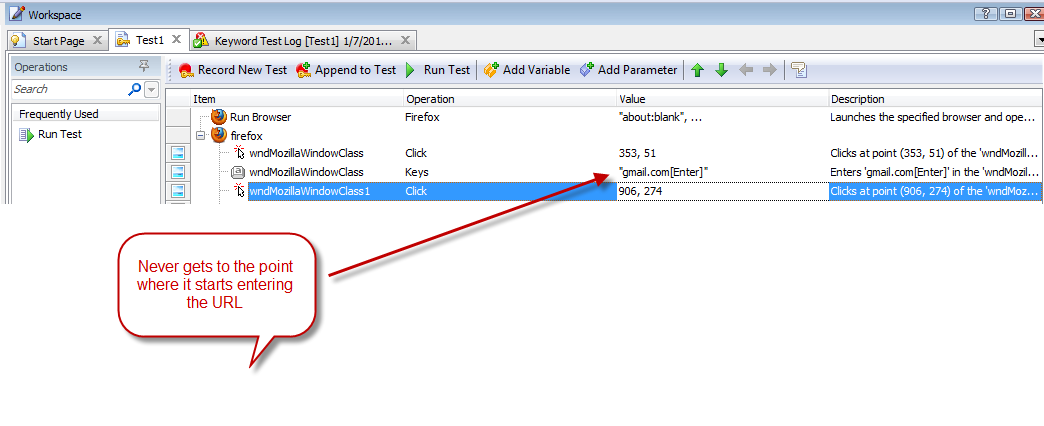
Recorded the test, all looked fine
In TestComplete I click on Run Test to see what it does. It fails after Firefox opens, and it logs the following error:
URL: about:blank
Process ID: 2324
Process Command Line: "C:\Program Files\Mozilla Firefox\firefox.exe"
Info: Cannot find the Page node after calling the NavigateTo method.
Aliases.firefox
(Sys.Process("firefox"))
In the playback of the test, Firefox opens to the screen, but I do not see a click into the address bar, or the actual web URL be typed.
I haven't done the additional browser settings for FF as discussed in the helpfile, but I would think that my simple recorded test would at least get the URL that was typed in during recording.
Ideas?
So, trying to do a very simple test in Firefox, to open and go to a URL.
Recorded the test, all looked fine
In TestComplete I click on Run Test to see what it does. It fails after Firefox opens, and it logs the following error:
URL: about:blank
Process ID: 2324
Process Command Line: "C:\Program Files\Mozilla Firefox\firefox.exe"
Info: Cannot find the Page node after calling the NavigateTo method.
Aliases.firefox
(Sys.Process("firefox"))
In the playback of the test, Firefox opens to the screen, but I do not see a click into the address bar, or the actual web URL be typed.
I haven't done the additional browser settings for FF as discussed in the helpfile, but I would think that my simple recorded test would at least get the URL that was typed in during recording.
Ideas?