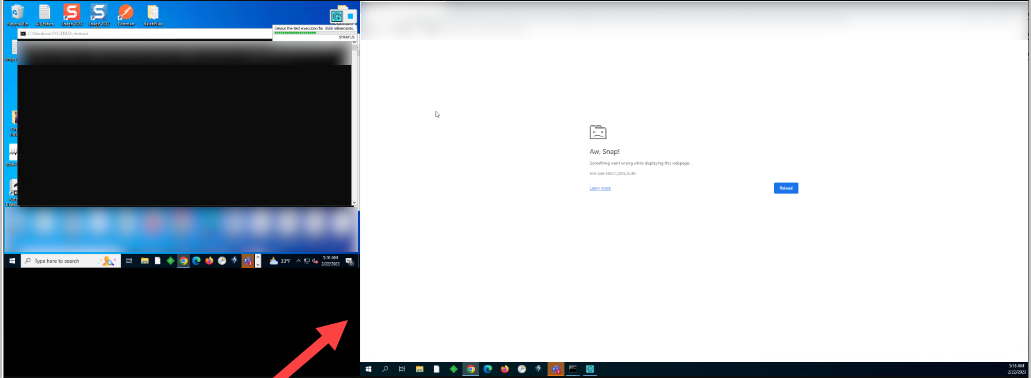
ContributionsMost RecentMost LikesSolutionsTestExecute logs out before tests run Running our tests on Azure Pipelines using VMs that we disconnect from for the tests to run at night. Sometimes when tests run at night they cannot because TE needs to get logged back in. Is there a way to make sure it stays logged in or to have the pipeline sign in? I'm guessing this is just a standard login time out but this affects our nightly runs when it does time out. When they run and it logs out it just has this login page open when we check them. MHT files not opening in browser Hi, Is anyone having issues with opening MHT files in Edge or chrome now? Or has a different solution to open the MHT files. I have been searching and only finding old discussions about MHT not displaying in browser. SolvedLog into windows automatically on Azure Pipeline Hi, I have setup running our tests nightly on a Azure pipeline. This works if we disconnect using the tscon command. That said sometimes the VMs restart or get locked so tests fail. I setup an Interactive agent with auto-logon and it does not log in after restart. I went through MS documentation and the agent seems to be setup correctly and works with logged in and running. Is there any documentation to get tests running on pipeline if the VM is locked and not disconnected using the tscon command to keep it open? Thanks, Re: Running test execute on pipeline causes 2 screens on vm I'll look through that. Each user has their own VM and only 1 user logs into it. Also, Thanks for your help. Re: Running test execute on pipeline causes 2 screens on vm They are logged in and use tscon. Then the tests run. When I do the same I don't have this issue. Could there be some setting they have different than mine causing this? Re: Running test execute on pipeline causes 2 screens on vm Test Execute. Also, when I try and recreate the issue I cannot, but nightly it happens for them. Re: Running test execute on pipeline causes 2 screens on vm They have multiple monitors but only run RDP on one monitor and disconnect. They each have their own login for the VMs. Running test execute on pipeline causes 2 screens on vm I have our test complete tests setup on an Azure pipeline. Our testers disconnect from their VMs at night using the https://support.smartbear.com/testcomplete/docs/testing-with/running/via-rdp/keeping-computer-unlocked.html When the tests run at night it is showing multiple screens: This happens to 2 different people. Re: Issue with merging in branches where conflicts or changes do not show in the commit Testcomplete: 15.42.9.7 TortoiseGIt: 2.13.0.11 I've verified and everyone is using the same versions for both. Issue with merging in branches where conflicts or changes do not show in the commit Running the latest Test complete and Tortoise GIT. Lately, when pulling in the latest master or trying to merge in a branch the merge will not show any changes in the commit or it will show there are conflicts but not show or list any conflicts. I've tried reverting changes and merging in branches in different order or using different machines to try and merge. I have also re-cloned the repo on the machines and nothing seems to allow merges once in this state. I have to resort to manually merging tests and name mappings into a single branch and merge it in a single PR. I haven't had any issues like this until recently.